
 By Nila Kartika Wati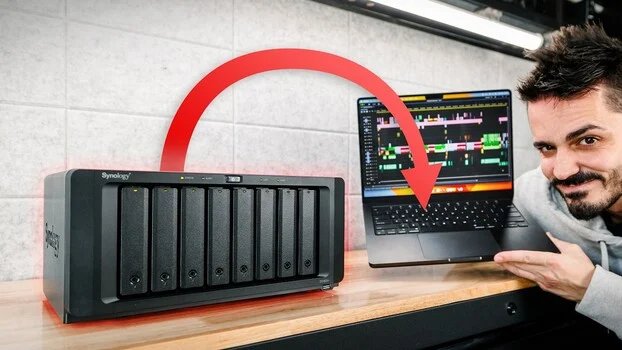
Choosing between a portable hard drive and a dedicated Network-Attached Storage (NAS) setup is one of those decisions that quietly shapes how much friction digital creatives encounter daily in their workflow. The traditional method of physically disconnecting a drive and carrying it between workstations, a common practice for many, is increasingly recognized as an inefficient and often precarious approach to managing valuable digital assets. This paradigm shift towards more integrated and resilient storage solutions is the focus of a recent detailed video by Anthony Gugliotta, a seasoned professional who outlines the intricate workings of a NAS and its transformative potential for handling vast libraries of photos, video, and raw files.
The Evolution of Digital Asset Management: From DAS to NAS
For years, creative professionals relied on Direct-Attached Storage (DAS) – external hard drives connected directly to a single computer via USB or Thunderbolt. While simple and relatively inexpensive, DAS presents significant limitations in collaborative environments, scalability, and accessibility. The advent of high-resolution digital cameras and advanced video production tools has dramatically increased file sizes, pushing storage requirements into the multi-terabyte range for individual projects, let alone entire professional archives. A single 4K video project can easily consume hundreds of gigabytes, and 8K workflows push this even further, demanding robust, high-speed, and universally accessible storage solutions.
Gugliotta’s insights, drawn from years of practical experience, underscore how a NAS fundamentally redefines this landscape. Unlike DAS, which is tethered to one machine at a time, a NAS connects directly to a network router. This central connection point allows multiple devices – desktops, laptops, tablets, and even smartphones – to access the same pool of files concurrently without the need for physical cable manipulation. This network-centric approach eliminates workflow bottlenecks, facilitates seamless collaboration, and ensures that critical data is always within reach, regardless of the workstation being used.
During his demonstration, Gugliotta vividly illustrates this capability by showing raw photo files being read directly from his NAS into Adobe Lightroom in real-time. This live proof of concept is particularly compelling for photographers and videographers who frequently work with large, uncompressed media. The ability to fluidly browse, edit, and export files from a central, networked repository without performance degradation is a testament to the modern capabilities of NAS systems. Gugliotta’s personal experience, having managed his Lightroom catalog this way for years, serves as a robust validation of the workflow’s reliability and efficiency. This long-term adoption highlights not just the initial appeal but the sustained practical benefits of such a system in a professional context.
Ensuring Data Integrity: The Role of RAID in Modern Storage
One of the more critical aspects addressed early in Gugliotta’s video is the configuration of RAID (Redundant Array of Independent Disks) – a fundamental component of any robust NAS setup. RAID is not merely about increasing storage capacity; its primary purpose is data redundancy and improved performance. Gugliotta emphasizes that RAID 1, the minimum recommended configuration for critical data, mirrors the contents of two identical drives. This means that if one drive fails, its data is replicated on the other, ensuring that operations can continue uninterrupted and data remains intact. This level of hardware-based protection is crucial for professionals whose livelihood depends on the accessibility and integrity of their digital assets.
For his setup, Gugliotta utilizes Seagate IronWolf NAS-specific drives. These drives are engineered differently from standard desktop hard drives, optimized for the continuous 24/7 operation, constant read/write cycles, and vibration tolerance inherent in a multi-drive NAS enclosure. Industry data consistently shows that NAS-optimized drives exhibit lower failure rates in multi-drive environments compared to their desktop counterparts, making them a wise investment for long-term data security. For instance, studies by companies like Backblaze, which analyze millions of hard drive hours, frequently highlight the superior endurance of enterprise or NAS-specific drives under heavy workloads.
Beyond basic RAID levels, advanced implementations like Synology’s Hybrid RAID (SHR) offer even greater flexibility. SHR allows users to start with a smaller number of drives, such as two, and expand the storage volume over time by adding more drives of varying capacities without the need to rebuild the entire array from scratch. This adaptability is a significant advantage for creatives who may not be ready or able to commit to a fully loaded, maximum-capacity setup from day one, offering a pathway for future growth as their data needs inevitably expand. This scalability is a key differentiator from many traditional DAS solutions, which often require replacing entire drives or enclosures to expand capacity.
The Critical Distinction: RAID is Not a Backup
Despite the robust data protection offered by RAID, Gugliotta makes a point that cannot be overstated: RAID is not a backup. This distinction is paramount for anyone managing valuable digital content. While RAID protects against hardware failure (specifically, a drive dying), it does not safeguard against other common forms of data loss. This includes accidental deletion, file corruption due to software errors, or malicious attacks such like ransomware. If a file is accidentally deleted or corrupted on a RAID array, that corrupted or deleted state is mirrored across all redundant drives in the array. Similarly, a ransomware attack encrypting files on the primary drive would also encrypt the mirrored copies.
To truly protect data, a separate backup strategy is essential, adhering to the "3-2-1 rule": at least three copies of your data, stored on two different types of media, with one copy kept offsite. This multi-layered approach provides comprehensive protection against a wider array of threats, from localized hardware failures to catastrophic site-specific disasters.
Innovative Offsite Backup: A Cost-Effective Alternative to Cloud Services
Gugliotta’s approach to offsite backup exemplifies a creative and financially savvy alternative to traditional cloud-based solutions. Rather than incurring ongoing monthly or annual fees for a cloud service, he has opted to establish a second NAS unit at his sister’s house. This older, 6-bay Synology NAS will sync over the internet with his new, more powerful 8-bay unit located at his home.
This strategy offers several compelling advantages. While cloud services provide convenience, the cost of storing vast amounts of high-resolution photo and video data can quickly become prohibitive. For professionals managing tens or hundreds of terabytes, the cumulative cost of cloud subscriptions over several years often surpasses the one-time investment in a second physical NAS. Gugliotta’s decision, made after carefully calculating the long-term expenses, demonstrates a shrewd understanding of total cost of ownership (TCO). This self-hosted offsite backup grants him full control over his data, potentially offering enhanced privacy and faster recovery times for large datasets compared to downloading from a cloud provider, which can be bottlenecked by internet speeds.
The primary NAS unit Gugliotta highlights is a Synology DS1823xs+ (or a similar high-performance 8-bay model), which typically retails around $1,100 for the enclosure alone. He wisely advises a rough 50/50 budget split between the NAS unit and the drives. This recommendation is critical because, while the NAS enclosure is a one-time purchase, the drives are consumables with a finite lifespan and represent a significant portion of the overall investment. Investing equally ensures high-quality, reliable drives that can handle the demands of a professional workflow.
Essential Safeguards: The Uninterruptible Power Supply (UPS)
Beyond the NAS and its drives, Gugliotta identifies an uninterruptible power supply (UPS) as a near-essential, almost non-optional, add-on. A UPS is far more than just a battery backup; it acts as a critical buffer between the NAS and the often-unstable electrical grid. It protects the NAS from power surges, voltage fluctuations, and provides a crucial window of battery power during an outage.
In the event of a power failure, a UPS allows the NAS to perform a graceful shutdown, preventing data corruption that can occur from an abrupt power loss. This is particularly vital when no one is home to manually shut down the system. Without a UPS, a sudden power cut can lead to corrupted file systems, damaged databases (like a Lightroom catalog), or even physical damage to the hard drives, potentially causing a very bad day for any data owner. For many setups, this single addition can save countless hours of troubleshooting and the catastrophic loss of irreplaceable data, making its modest cost a negligible investment compared to the potential risks. UPS units also often provide surge protection, further safeguarding sensitive electronics from electrical spikes.
Advanced Configurations for Demanding Workflows
For professionals engaged in highly demanding tasks such as 4K or 8K video editing, where data throughput and processing power are paramount, Gugliotta’s video delves into advanced configurations. These include RAM upgrades, NVMe SSD caching, and 10 Gigabit Ethernet (10GbE) cards.
- RAM Upgrades: Increasing the RAM in a NAS significantly boosts its ability to handle multiple concurrent tasks, serve numerous users, and manage complex operations like running virtual machines or Docker containers. For a Lightroom catalog, which is essentially a database, more RAM can lead to snappier performance, especially when handling large catalogs or performing complex searches and previews.
- NVMe SSD Caching: SSD caching involves installing one or more fast NVMe solid-state drives within the NAS to act as a high-speed buffer for frequently accessed data. This dramatically accelerates read and sometimes write operations, making tasks like browsing large photo libraries or scrubbing through video timelines much smoother. While not increasing raw storage capacity, it significantly enhances the perceived performance of the system, particularly in scenarios involving hot data that is accessed repeatedly.
- 10 Gigabit Ethernet (10GbE) Cards: Standard Gigabit Ethernet (1GbE) offers theoretical speeds of up to 125 megabytes per second (MB/s). While sufficient for many tasks, it becomes a bottleneck for uncompressed 4K or multi-stream 8K video editing, where sustained data rates can easily exceed 500 MB/s. Upgrading to a 10GbE network interface card (NIC) and compatible network infrastructure (switches, cables) multiplies the available bandwidth tenfold, providing the necessary throughput for professional video editors to work directly from the NAS without performance compromises. This allows for truly collaborative, real-time editing workflows where multiple editors can access the same high-resolution footage simultaneously.
Broader Implications for the Creative Industry
The shift towards sophisticated NAS solutions, as advocated by Gugliotta, holds significant implications for the broader creative industry.
- Enhanced Efficiency and Collaboration: Centralized, high-speed storage fosters seamless collaboration among teams, whether co-located or remote. Files are always up-to-date and accessible, eliminating version control issues and the delays associated with transferring large datasets.
- Scalability and Future-Proofing: NAS systems are designed for growth. As data volumes continue their inexorable rise, these systems can be expanded by adding more drives, increasing capacity, or upgrading internal components, offering a degree of future-proofing that single external drives cannot match.
- Cost-Effectiveness in the Long Run: While the initial investment in a multi-bay NAS, drives, and a UPS might seem higher than a single external drive, the total cost of ownership over several years often proves more economical than recurring cloud storage fees, especially for high-volume users.
- Data Security and Sovereignty: Owning and controlling one’s data on a private NAS offers greater privacy and security compared to relying solely on third-party cloud providers, while also providing faster recovery in many disaster scenarios.
- Workflow Optimization: The ability to access and work with large raw files directly from the network significantly streamlines creative workflows, reducing friction and allowing artists to focus more on their craft and less on managing their data.
In conclusion, Anthony Gugliotta’s comprehensive guide underscores that for creative professionals, robust data management is no longer a luxury but a fundamental requirement. By embracing network-attached storage, implementing proper RAID configurations, understanding the critical difference between RAID and backup, and investing in essential safeguards like a UPS, digital artists can build a resilient, scalable, and efficient infrastructure that safeguards their invaluable work for years to come. The video serves as a compelling call to action for anyone looking to move beyond the limitations of traditional storage and embrace a more professional, future-ready approach to their digital assets.
