
 By Nila Kartika Wati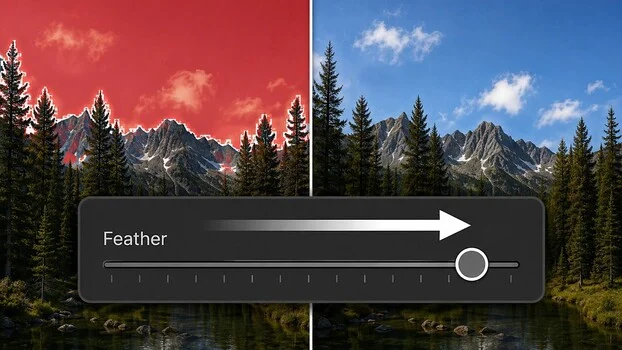
Adobe has released a significant update to its popular photo editing software, Lightroom, introducing two powerful new sliders — Feather and Edge — designed to eliminate the long-standing issue of "mushy, halo-ringed edges" around masked selections. This enhancement, available across both Lightroom Classic and the cloud-centric Lightroom, marks a pivotal shift in how photographers approach complex selections, moving towards a more intuitive, painting-like workflow rather than demanding meticulous technical precision upfront. The new controls are poised to dramatically improve the quality of AI-based masks and streamline the post-processing workflow for countless users, particularly those working with landscapes, wildlife, and intricate subjects.
The Persistent Challenge of Masking Precision in Digital Photography
For years, digital photographers have grappled with the inherent difficulties of creating perfectly seamless selections, especially when dealing with fine details like tree branches against a bright sky, animal fur, or complex horizons. Traditional masking techniques, even with sophisticated tools, often left behind subtle yet visible artifacts: a faint glow or "halo" where the mask didn’t quite meet the subject, or a harsh, unnatural transition. This issue was exacerbated by the increasing sophistication of AI-powered selection tools, which, while remarkably accurate for broad strokes, sometimes struggled with the microscopic nuances of a boundary.
Before these new sliders, achieving a truly natural blend required painstaking manual refinement. Photographers would often resort to tedious brushwork, layering multiple masks, subtracting from selections, or even exporting images to more specialized software like Adobe Photoshop for advanced blending techniques. This process was time-consuming, often frustrating, and could significantly impede creative flow, particularly for high-volume photographers or those on tight deadlines. The demand for a more efficient and effective solution to these edge artifacts has been a consistent plea within the photography community, signaling a clear need for tools that could bridge the gap between AI’s initial selection capabilities and the nuanced demands of professional-grade image editing.
Unveiling the New Controls: Feather and Edge
The newly introduced Feather and Edge controls are strategically located at the top of the masking panel in both Lightroom applications. Renowned photography educator Matt Kloskowski has provided comprehensive demonstrations, illustrating their precise functionality and transformative impact.
The Feather slider directly controls the blur applied to the boundary of a mask. Ranging from zero (a hard, crisp edge) to 100 (a highly diffused transition), this control allows photographers to soften the mask’s perimeter, creating a gradual blend between the masked and unmasked areas. Kloskowski notes that while the slider goes to 100, extreme values are rarely necessary, suggesting that even subtle feathering can achieve significant improvements in blend quality. For instance, when brightening a sky selection, a touch of feathering can prevent a harsh line where the sky meets a mountain range, instead creating a more organic, atmospheric transition.
The Edge slider, conversely, operates from a central zero point. Moving the slider to the left contracts the mask, pulling its boundary inward, while moving it to the right expands the mask, pushing its boundary outward. This control is particularly effective in resolving those tricky "halo" issues. In a common scenario where a sky selection leaves a faint bright line around tree branches, sliding the Edge control slightly to the right pushes the sky mask into the branches, effectively hiding the visible seam. This approach prioritizes concealing imperfections rather than striving for an elusive "perfect" initial selection, acknowledging the practical realities of complex imagery.
These powerful new sliders are seamlessly integrated across Lightroom’s most advanced AI-based masks, including Subject, Sky, Background, People, Objects, and Landscape. This broad compatibility ensures that photographers can leverage these refinement tools regardless of the complexity of their initial AI selection. It is important to note, however, that traditional masking tools such as the Brush, Linear Gradient, and Radial Gradient are exceptions. These tools already incorporate their own built-in feathering settings, designed for more direct, localized control, making the new global Feather and Edge sliders redundant for those specific applications.
Kloskowski’s demonstrations vividly illustrate the effectiveness of these controls. He showed how a deliberately over-pushed sky adjustment, which initially created glaring halos around trees, could be quickly rescued and made believable using a combination of Feather and Edge. Similarly, when brightening the foreground of an image featuring a bear, where hard edges around foliage and across the ground became apparent after the adjustment, a simple application of the Feather slider alone was sufficient to soften the transition and achieve a natural look without needing to touch the Edge control. These examples underscore the versatility and intuitive nature of the new features.
A Paradigm Shift: From Technical Selection to Artistic Blending
Perhaps the most profound implication of these new controls is the philosophical shift they represent in photo editing. Traditionally, achieving high-quality masked adjustments demanded meticulous technical work upfront. Photographers had to invest significant time in creating precise selections, often involving careful brushwork, intricate path tracing, and iterative refinement to ensure clean edges before even beginning to apply adjustments. Any slight inaccuracy would necessitate backtracking and further technical effort.
The Feather and Edge sliders, however, usher in an era where the emphasis shifts from technical precision to artistic blending. The new workflow encourages photographers to accept a "good enough" initial selection from the AI tools, make their desired adjustments, and then, after evaluating the visual impact, use Feather and Edge to seamlessly blend the mask into place. This approach mirrors how professional retouchers have long handled edge refinement in more advanced tools like Photoshop, where blending and softening are often post-adjustment steps rather than pre-selection requirements.
This change rewards the photographer’s "eye" over their "patience." Instead of getting bogged down in pixel-perfect selections, users can focus on the creative vision, make adjustments, and then fine-tune the integration of those adjustments into the overall image. For photographers specializing in challenging subjects like landscapes with intricate foliage or wildlife with fine fur, where automated selections often struggle with minute details, this reordering of operations is revolutionary. It allows for a more fluid and experimental approach, fostering greater creative freedom and reducing the technical friction that often accompanies complex edits. This aligns perfectly with Adobe’s overarching strategy of leveraging artificial intelligence to democratize advanced editing techniques and streamline creative workflows across its Creative Cloud suite.
Chronology of Adobe’s AI Masking Evolution
The introduction of Feather and Edge is the latest step in a continuous evolution of masking capabilities within Adobe Lightroom, reflecting a broader industry trend towards AI-driven automation in creative software.
Historically, Lightroom offered basic masking tools such as the Adjustment Brush, Radial Filter, and Graduated Filter. While effective for broad tonal adjustments, these tools relied entirely on manual input, requiring users to "paint" their selections, which could be time-consuming and imprecise for complex shapes.
The true revolution began with the integration of more sophisticated AI-powered masking features. In late 2021 and early 2022, Adobe introduced a suite of intelligent selection tools:
- Select Subject: Automatically identifies and selects the main subject in an image.
- Select Sky: Automatically detects and selects the sky region.
- Select Background: Automatically selects the area behind the subject.
- Select People: A more advanced feature that can identify individual people and even specific body parts (face, hair, eyes, teeth, etc.).
- Select Objects: Allows users to define an object with a simple brush stroke or rectangle, and AI then refines the selection.
- Select Landscape: A newer addition that intelligently identifies land features for targeted adjustments.
These initial AI masks, while groundbreaking, were not without their limitations, particularly concerning the edge quality discussed earlier. The "halo effect" became a noticeable challenge as photographers pushed the boundaries of these automated selections. The current update, featuring the Feather and Edge sliders, directly addresses these known pain points, representing a crucial refinement in the AI masking ecosystem. This iterative development cycle underscores Adobe’s commitment to continuous improvement, responding to user feedback and leveraging advancements in machine learning to enhance the user experience and the quality of output. It is a testament to Adobe’s strategy of delivering incremental yet impactful updates, ensuring that its Creative Cloud applications remain at the forefront of digital imaging technology.
Broader Implications for Photographers and the Industry
The implications of these new masking controls extend far beyond simply fixing halos; they represent a significant step forward for the entire photography community and the wider digital imaging industry.
- Enhanced Workflow Efficiency: By reducing the need for meticulous upfront selection work, photographers can save substantial time on each edit. This efficiency gain is particularly valuable for professionals handling large volumes of images, allowing them to focus more on creative decisions rather than technical minutiae.
- Improved Image Quality and Professional Output: The ability to seamlessly blend adjustments ensures a more natural and polished final image. This means fewer visible artifacts, more convincing composites, and an overall higher standard of professional output, even for users who previously struggled with advanced masking.
- Democratization of Advanced Editing: The intuitive nature of Feather and Edge makes sophisticated masking techniques accessible to a broader audience. Amateur and enthusiast photographers can now achieve results that were once the exclusive domain of highly experienced retouchers, lowering the barrier to entry for complex image manipulation.
- Increased Creative Freedom: When technical constraints are reduced, creative possibilities expand. Photographers are empowered to experiment more boldly with localized adjustments, knowing that they have the tools to flawlessly integrate those changes into their images without compromising realism.
- Strengthening Adobe’s Market Position: By continuously innovating and addressing key user pain points, Adobe reinforces its leadership in the photo editing software market. Features like Feather and Edge demonstrate a responsiveness to user needs and a commitment to leveraging cutting-edge AI, further solidifying Lightroom’s appeal against competitors.
- Future of AI in Photo Editing: This update signals a clear direction for Adobe: AI will continue to evolve from mere selection to intelligent refinement and integration. We can anticipate future developments that further automate and perfect the blending process, allowing photographers to focus almost entirely on their artistic vision.
Other Notable Updates Accompanying the Masking Enhancements
Beyond the groundbreaking masking controls, Adobe also rolled out a couple of other noteworthy updates, catering to different aspects of the Lightroom ecosystem.
For users of Lightroom Classic, a specific enhancement has been made to the crop tool. By right-clicking inside the crop area, users can now access a "crop mask" with an adjustable opacity. This feature allows photographers to control how visible the difference is between the cropped and uncropped areas of an image. This is particularly useful for visualizing the impact of a crop without permanently discarding pixels, aiding in the decision-making process for framing and composition. It provides a more nuanced way to assess the crop’s effect on the overall image context.
In the cloud-based Lightroom, Adobe has integrated a credit icon tied to its Generative Expand feature. This icon now clearly indicates when a generative AI operation will draw down a user’s Adobe Creative Cloud credits. Generative Expand, a powerful tool for extending image boundaries using AI, is a credit-intensive feature. Providing transparent credit tracking within the application itself is a crucial usability improvement, helping users manage their resource consumption, especially those who work extensively with generative AI without necessarily opening Photoshop. This distinction also highlights the ongoing evolution of feature parity and unique functionalities between Lightroom Classic (often preferred by desktop-centric professionals) and the newer, cloud-integrated Lightroom.
Expert and Community Reactions
The introduction of the Feather and Edge sliders has been met with widespread enthusiasm across the photography community. Industry educators, professional retouchers, and amateur enthusiasts alike have quickly praised the intuitive nature and profound effectiveness of these new controls. Many have highlighted how these features address a long-standing frustration, describing them as a "game-changer" for their workflow. Analysts have also noted this update as a strategic move by Adobe, demonstrating its responsiveness to user feedback and its continued investment in refining AI-powered tools to meet real-world photographic challenges. The general consensus points to a significant enhancement in the usability and power of Lightroom’s masking capabilities, solidifying its position as a leading tool for image editing.
Conclusion
The introduction of Feather and Edge sliders in Adobe Lightroom represents more than just a software update; it signifies a transformative moment in the evolution of digital photo editing. By directly addressing the persistent challenge of imperfect mask edges, Adobe has empowered photographers with tools that not only improve image quality but also fundamentally alter the creative workflow. The shift from demanding technical precision to enabling artistic blending allows for greater efficiency, creative freedom, and professional-grade results for a broader audience. Coupled with other valuable updates like the crop mask opacity in Classic and generative expand credit tracking, these enhancements underscore Adobe’s unwavering commitment to innovation and to meeting the evolving needs of the global photography community. As AI continues to integrate deeper into creative applications, these advancements pave the way for an even more intuitive and powerful future in image manipulation.
