
 By Nila Kartika Wati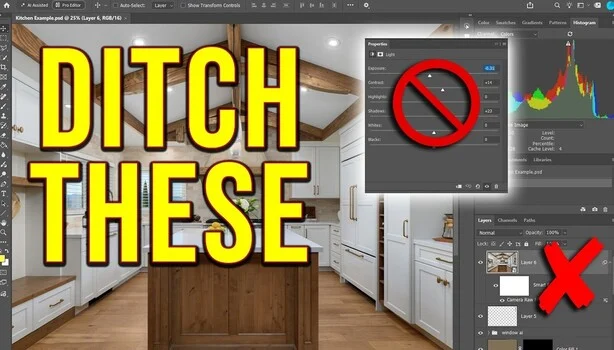
The past year has seen Adobe Photoshop undergo a significant transformation, with a rapid introduction of new AI-powered features and a substantial rework of its core adjustment layers. These updates, frequently touted by Adobe as advancements designed to streamline workflows and unlock new creative possibilities, have instead become a point of contention and careful scrutiny among the professional creative community. As tools fundamental to daily operations evolve, users are compelled to evaluate whether these new iterations genuinely deliver on promises of speed and simplicity, or if they introduce unforeseen compromises in image quality, system responsiveness, and the financial burden of generative credits. This ongoing integration of artificial intelligence, particularly through the Firefly generative AI models, marks a pivotal moment in the evolution of digital imaging software, prompting a critical examination of its practical implications for photographers, designers, and retouchers worldwide.
Background: Adobe’s AI Ambition and the Creative Landscape
Adobe’s foray into generative AI, spearheaded by its Firefly family of models, is part of a broader strategic initiative to embed AI capabilities across its Creative Cloud ecosystem. Announced in March 2023 and rapidly integrated into flagship products like Photoshop and Illustrator, Firefly represents Adobe’s response to the burgeoning field of generative AI, which has seen rapid innovation from competitors such as Midjourney, DALL-E, and Stability AI. The stated goal is to democratize creativity, enabling users of all skill levels to produce high-quality content more efficiently and explore new artistic directions previously constrained by technical complexity or time.
For decades, Photoshop has been the industry standard for image manipulation, built on a foundation of precise, layer-based editing. The introduction of AI, particularly features like Generative Fill and Generative Expand, signifies a fundamental shift from purely manual, pixel-level manipulation to AI-assisted content creation. This evolution is not merely incremental; it redefines the interaction model between user and software, promising to automate repetitive tasks and generate novel elements with text prompts. Adobe’s long-standing Sensei AI platform has underpinned intelligent features for years, but Firefly’s generative capabilities represent a leap into a more transformative AI paradigm, aiming to keep Adobe at the forefront of a rapidly changing creative technology landscape.
The AI-First View: A Divergence in Workflow and Quality
One of the most notable changes highlighted by expert users, including renowned photographer and educator Nathan Cool, is the introduction of Photoshop’s AI-first view. This alternative interface, designed to mirror the simplified experience of Firefly on the web, presents a distinct departure from Photoshop’s traditional layer-centric workflow. Cool’s practical demonstrations reveal a critical operational detail: upon activating this AI-first view, Photoshop does not merely adapt its existing canvas; it creates a duplicate of the user’s document and, crucially, flattens all existing layers. This irreversible action within that view immediately raises concerns about non-destructive editing principles, a cornerstone of professional Photoshop usage.
Cool’s tests, such as a simple object removal on a kitchen still life, expose tangible quality discrepancies. While the AI-first view successfully removes the intended object, a subsequent return to the Pro Editor view and a 100% zoom level reveals a noticeably softer, less detailed appearance in the AI-edited area compared to the untouched regions of the image. The surrounding elements, such as text on a cookbook, retain their crispness, starkly contrasting with the AI-generated patch. This loss of fidelity, even for seemingly straightforward tasks, poses a significant challenge for professionals who demand pixel-perfect results and maintain stringent quality controls for commercial and artistic work.
Furthermore, the transition between the AI-first and Pro Editor views is not seamless. Users often experience considerable lag, disrupting the flow of work, and in some instances, the process fails entirely, returning an error message. Such instability and performance bottlenecks can erode productivity and confidence in the software, especially when operating under tight deadlines common in professional environments. For those who find the AI-first view counterproductive or detrimental to their workflow, Adobe has provided an option within the Preferences menu (Interface settings) to disable its visibility, offering a temporary reprieve from a feature that may not align with their established practices.
The Overhaul of Adjustment Layers: Inconsistency and Legacy Concerns
Beyond the generative AI features, Adobe has also systematically reworked fundamental adjustment layers, causing further disruption and necessitating a re-evaluation of established editing techniques. The venerable Brightness/Contrast adjustment, a staple for quick tonal adjustments for decades, has been notably absent from the new adjustment layer menu. In its place, a new "Light" layer has been introduced, consolidating controls such as exposure, contrast, highlights, and other tonal sliders, drawing heavily from the interface and functionality familiar to users of Lightroom Classic and Camera Raw.
While the aim might be to unify the tonal adjustment experience across Adobe’s suite, Cool’s analysis highlights significant inconsistencies. Despite the removal from the primary menu, the legacy Brightness/Contrast adjustment can still be accessed through a "pre-2026 option" within the panel menu. This temporary provision, however, comes with an implied expiry date, leaving users uncertain about the longevity of their accustomed tools. More critically, Cool demonstrates that the new "Light" layer does not linearly translate to its legacy counterparts. A specific adjustment, such as a quarter-stop exposure boost in the new layer, correlates to a value of 13 in the legacy layer, yet the visual impact on the image when toggling between the two versions is distinctly different. This mismatch creates a significant hurdle for maintaining consistency across a series of images, especially when revisiting older files or collaborating on projects where precise tonal matching is crucial. Such discrepancies can undermine the reliability of presets and actions built on older layer structures, requiring professionals to re-learn and re-calibrate their entire approach to tonal adjustments.
Cool also pertinent reminds users that a dedicated "Exposure" adjustment layer, complete with offset and gamma controls, has been a long-standing feature in Photoshop. This existing tool offers a more granular and often more accurate method for exposure adjustments, raising questions about the necessity and implementation of the new "Light" layer without direct equivalence or improved functionality over existing, proven methods.
The Stamped Smart Object Workflow: A Bastion of Control
Amidst these turbulent changes, expert users like Nathan Cool advocate for robust, time-tested methodologies that offer greater control and future-proofing against ongoing software revisions. The "stamped layer converted to a smart object" workflow emerges as a highly flexible and reliable method for finishing images in Photoshop, particularly appealing to those who prefer a non-destructive approach.
The technique involves merging all visible layers onto a new layer while preserving the underlying layer stack intact. This is achieved through the keyboard shortcut Ctrl+Alt+Shift+E on Windows or Cmd+Option+Shift+E on a Mac. This newly created merged layer is then converted into a Smart Object via a right-click. The critical next step involves applying the Camera Raw Filter (Ctrl+Shift+A or Cmd+Shift+A). This opens the entire Camera Raw panel, granting access to a comprehensive suite of adjustments including color grading, optics corrections, geometry transformations, and various effects. The paramount advantage here is that every slider and setting within the Camera Raw Filter remains fully editable. A simple double-click on the Smart Filter entry in the Layers panel reopens the Camera Raw interface, allowing for precise, non-destructive modifications at any stage.
Furthermore, Smart Filters carry their own masks, providing immense flexibility. Users can selectively paint in or out the effects of the Camera Raw Filter, achieving localized adjustments with the same precision as traditional adjustment layers. This method also permits multiple applications: one could create a smart object for a global grade and another for targeted corrections, layering complex adjustments without committing them permanently. This workflow is particularly intuitive for individuals already accustomed to Lightroom’s slider-based editing paradigm, offering them similar controls at the culmination of a layered Photoshop edit. Crucially, this method offers a degree of resilience against Adobe’s continuous updates, ensuring that core editing capabilities remain consistent and accessible, regardless of which specific adjustment layers are introduced or retired in future versions.
Workflow Friction, Generative Credits, and Cost Implications
The integration of new adjustment layers does not always operate smoothly alongside traditional Photoshop layers, leading to noticeable friction in the editing process. Cool’s experiments reveal that when new layers, such as Light, Color, Vibrance, Clarity, and Dehaze, are stacked above an older Levels layer, dragging the white point slider in the Levels layer triggers a "some adjustments are paused" notice. The preview actively shifts while the mouse button is held down, only settling into its final, accurate state once the mouse is released. This intermittent preview behavior introduces uncertainty and inefficiency, as users cannot accurately judge the effect of their adjustments in real-time, necessitating a trial-and-error approach that slows down meticulous editing.
Beyond workflow disruptions, the financial implications of generative AI are becoming a significant concern for professionals. Adobe’s credit-based system for generative AI features means that every use incurs a cost, which can accumulate rapidly, especially on commercial projects requiring multiple iterations. A Firefly Fill & Expand pass, for example, costs one generative credit. More advanced models, such as Firefly Image 5, demand 10 credits per generation. The introduction of partner AI models, such as Google’s Gemini (sometimes referred to as Nano Banana), further complicates the cost structure, potentially requiring as many as 40 credits for a single generation.
Cool illustrates this financial impact with a real-world commercial scenario: editing images of two Porsches still wrapped in plastic inside a warehouse. His tests with Firefly yielded unsatisfactory results, either swapping the existing plastic for different plastic or producing cars that fundamentally lost their Porsche characteristics. The need for precise, high-quality output for commercial clients often necessitates multiple generations, quickly depleting credit balances and adding unforeseen costs to project budgets. This credit system effectively monetizes every AI-driven action, shifting the cost burden directly onto the user, a departure from the traditional subscription model where all features were included.
To circumvent the quality and cost issues associated with in-Photoshop generative AI for such tasks, Cool demonstrates a practical workaround. This involves using a fixed-size 1,024 x 1,024 pixel marquee selection within Photoshop, exporting that selection, processing it through Gemini on the web (which may have a different credit or usage model), and then re-importing the result back into Photoshop as a new layer. A layer mask is then applied to seamlessly integrate the AI-generated content. This multi-application, manual workaround underscores the current limitations and cost inefficiencies of the integrated AI tools for demanding professional applications, forcing users to adopt more complex, time-consuming methods to achieve desired results without incurring excessive credit costs or sacrificing quality.
Broader Implications and the Path Forward
The rapid evolution of Photoshop with integrated AI presents a complex landscape for creative professionals. While the promise of faster, simpler workflows and enhanced creative capabilities is appealing, the current implementation introduces significant challenges related to image quality, workflow disruption, and cost. The flattening of layers in the AI-first view undermines non-destructive editing principles, while inconsistencies in new adjustment layers demand a re-learning curve and threaten historical workflow compatibility. The credit-based system for generative AI introduces an unpredictable cost factor that can quickly escalate on commercial projects, prompting users to seek external solutions or elaborate workarounds.
For Adobe, these changes are part of a larger strategy to maintain market leadership in a fiercely competitive and rapidly evolving technology sector. The company aims to position Photoshop as an indispensable tool in the age of generative AI, appealing to a broader base of creators while retaining its professional user base. However, the feedback from seasoned professionals like Nathan Cool highlights the critical need for Adobe to refine these integrations, ensuring they meet the stringent demands for quality, reliability, and cost-effectiveness that define professional creative work.
The future of digital imaging will undoubtedly be intertwined with artificial intelligence. However, the current transition period necessitates adaptability from users and responsive development from software providers. Professionals must continuously evaluate new tools, adapt their workflows, and potentially invest in hybrid approaches that combine traditional techniques with AI assistance, leveraging the strengths of each while mitigating their weaknesses. The ongoing dialogue between Adobe and its user base will be crucial in shaping the future of these tools, ensuring that innovation truly serves the creative community without compromising the quality and control that have long been the hallmarks of professional image editing.
