
 By Nila Kartika Wati
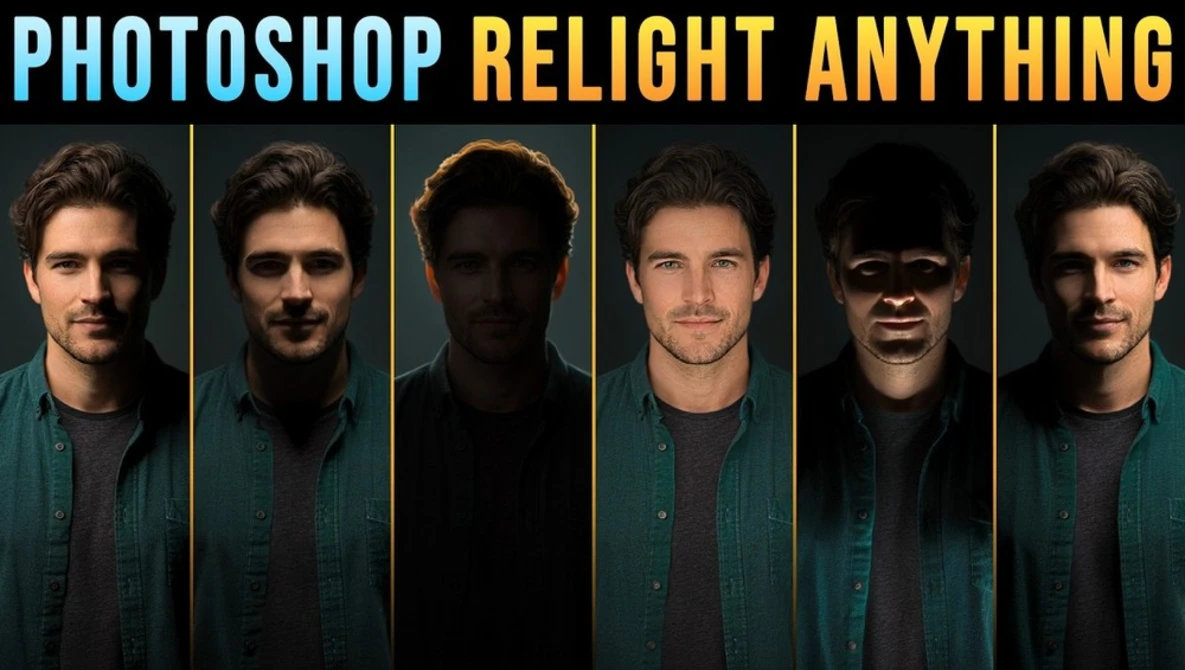
The advent of Adobe Photoshop’s new Relight feature, currently in beta, marks a significant leap in image manipulation, offering photographers and digital artists unprecedented control over lighting in finished photographs. No longer will flat window light or harsh shadows necessitate a costly reshoot or laborious hours spent on traditional dodging and burning. This innovative tool empowers users to reposition, soften, and recolor light sources within an image with a mere handful of intuitive sliders, effectively reimagining the scene’s illumination post-capture. This development underscores Adobe’s aggressive push into artificial intelligence (AI) integration across its Creative Cloud suite, aiming to democratize complex photographic techniques and streamline demanding workflows.
The Paradigm Shift: From Physical Light to Digital Manipulation
For decades, achieving optimal lighting has been a cornerstone of professional photography. The meticulous arrangement of strobes, softboxes, reflectors, and colored gels in a studio or on location demands significant technical skill, specialized equipment, and often considerable financial investment. Even with the best planning, unforeseen circumstances or artistic reconsiderations after the shoot could lead to expensive reshoots or countless hours in post-production attempting to digitally sculpt light and shadow. Manual techniques like dodging and burning, mainstays of both darkroom and early digital editing, are inherently subtractive or additive, requiring a high degree of precision and artistic judgment to simulate realistic light changes.
The global photography equipment market, valued at approximately $10.5 billion in 2023, with lighting equipment forming a substantial segment, reflects the industry’s reliance on physical tools. Relight, however, introduces a disruptive element by shifting a significant portion of this control into the digital realm, powered by sophisticated AI algorithms. This feature does not merely adjust exposure or contrast; it intelligently reconstructs the lighting environment of an image, allowing for the simulation of new light sources as if they were present during the original capture.
Unpacking Relight’s Core Functionality
The core of Relight resides within a dedicated layer, accessible via the Layers panel flyout menu or the main Layer menu. Upon creation, Photoshop intelligently analyzes the original image, effectively "hiding" it and building a new layer from its contents where the virtual light can be manipulated. This process is a testament to the advanced machine learning models underpinning the feature, which are capable of interpreting depth, surface textures, and existing light conditions to generate plausible new lighting scenarios.
One of the most profound controls is the "Original lighting" slider. Dragging this to 0% strips away the existing illumination, allowing the user to begin with a ‘blank canvas’ of light where only the newly introduced virtual light shapes the scene. From this foundation, users can control several key parameters:
- Intensity: This slider dictates the brightness of the virtual light source, ranging from subtle illumination to dramatic highlights.
- Diffusion: Emulating the physical properties of light sources, the Diffusion slider controls the size of the virtual light source. A lower diffusion value simulates a smaller, harder light source, casting sharper shadows, akin to a bare bulb or a focused spotlight. Conversely, a higher diffusion value creates a larger, softer light source, similar to a large softbox or an overcast sky, resulting in gentler transitions between light and shadow. This directly mirrors real-world physics, where shadow softness is proportional to the size of the light source relative to the subject.
- Light Icon Manipulation: A critical interactive element is the draggable light icon across the canvas. This intuitive control allows users to physically move the virtual light source, dynamically shifting highlights and shadows across the subject’s face or within the scene. The AI intelligently recalculates how light would fall from the new position, creating highly realistic effects that mimic actual relighting.
- Close/Far Slider: This innovative control dictates the perceived distance of the light source from the subject. Pushing the slider towards "Close" brings the light closer to the camera or subject, often resulting in more direct, impactful illumination. Moving it towards "Far" positions the light behind the subject, enabling the creation of dramatic backlit effects, including the popular "rim light" or "hair light" effect that outlines the subject against the background.
Jesús Ramirez of Photoshop Training Channel, a respected authority in the Photoshop community, extensively explored Relight’s capabilities, investing over 1,500 generative credits in his detailed analysis. His findings provide invaluable insight into the feature’s nuances. Ramirez demonstrated how the default 5,500 K color temperature setting, which approximates daylight and typical flash output, can be adjusted, allowing for the introduction of warm sunset tones or cool, artificial hues. His tests confirmed that photographers with an existing understanding of traditional lighting principles—such as how a hair light creates separation or how a large softbox wraps light—will find Relight’s controls incredibly intuitive, accelerating their ability to achieve believable results.
The Generative Credit Economy: A New Business Model for AI Features
Adobe’s generative credit system, already in place for features like Generative Fill, extends to Relight and introduces a new economic dimension to creative workflows. While adjusting sliders and previewing changes in a deliberately low-resolution mode is credit-free, committing to a final, high-resolution render costs 30 credits per instance. This renders the final version at the document’s full resolution, incorporating all chosen lighting adjustments. Crucially, reverting to edit the lights and then rendering again incurs another 30 credits. Discarding changes by pressing "Escape" remains free.
This credit system encourages thoughtful decision-making and pre-visualization. Ramirez noted that the final render can sometimes appear different from the low-resolution preview, emphasizing the need for users to judge the result only after it’s rendered. This necessitates a more deliberate approach, where choices are ideally settled before committing credits. The system effectively monetizes the computational power required for complex AI-driven image generation, aligning with Adobe’s broader strategy to transition its subscription model to include usage-based components for resource-intensive AI features. Industry analysts suggest this model could provide Adobe with a scalable revenue stream while also managing the immense cloud computing resources required to power its AI services. For users, it means a shift in mindset: every "Done" click carries a tangible cost, promoting efficiency and a deeper understanding of the tool before committing.
Expert Insights and Practical Applications: Strengths and Limitations
Ramirez’s extensive testing revealed both the impressive capabilities and current limitations of Relight, providing a valuable blueprint for users.
- Portraits: As expected, Relight performs exceptionally well with clearly defined subjects like portraits. The ability to sculpt light across a face, adjust diffusion for shadow softness, and introduce rim lights offers immense flexibility in refining facial features and creating mood.
- Architectural and Interior Shots: A surprising area of strength was interior photography. Ramirez demonstrated this by comparing two versions of the same interior, one with a window and one without. When "Original lighting" and "Intensity" were set to zero, the windowless room went dark as expected. However, the room with the visible window retained some light. This is because Relight intelligently treats visible light sources within the scene as part of the ambient light it’s recreating, allowing for nuanced control over existing natural light. While Relight can dim the light from a window, it cannot completely "switch off" a source it visually perceives as present in the scene, highlighting its interpretive AI nature. This "remaining ambient light" offers powerful control over balancing natural and artificial illumination.
- Pre-Visualization for Traditional Shoots: The free preview mode presents an intriguing application for professional photographers. It allows for cost-effective sketching of lighting setups before renting expensive gear or booking a studio. Users can experiment with different light positions, diffusion levels, and colored gels on similar images, gaining a rough understanding of how light will fall. This capability could significantly reduce trial-and-error in real-world shoots, saving both time and money.
- Composites and Layered Images: Relight’s current beta limitation is its focus on the active layer. When applied to a complex layered city scene, the effect initially landed only on a single jacket within the image, rather than the entire composition. Ramirez showcased a workaround, illustrating the necessity for users to adapt their workflow for multi-layered projects. He then demonstrated its power in composites by lighting a figure with red neon from a sign and adding a cyan rim light to create separation from the background, proving its creative potential once these workflow considerations are managed.
- Resolution and Fine Detail: While Adobe states the final render matches the input image’s pixel dimensions, Ramirez’s 100% zoom tests revealed that fine details like hair and texture in the Relight layer could appear softer than in the original. This observation, coupled with Adobe’s use of the word "upscale" in their announcement, suggests that the image might be generated at a smaller resolution and then enlarged to the document size. This could imply a trade-off in absolute fidelity for the sake of processing speed or efficiency in the current beta phase, an area likely to see refinement in future iterations.
- Landscape and Undefined Subjects: Not every image cooperates perfectly. In a landscape with the original light removed, the result sometimes resembled a flashlight beam rather than natural sunlight, even with increased diffusion. Relight seems to perform best with clearly defined subjects, such as people or interior spaces, where the AI can more effectively interpret depth and surface geometry.
Broader Context: Adobe’s AI-Powered Future
Relight is not an isolated feature but a key component of Adobe’s overarching strategy to infuse generative AI across its Creative Cloud applications. Photoshop, a software that has been synonymous with digital image editing since its inception in 1990, has continuously evolved, integrating innovations from layers and masks to smart objects and content-aware tools. The current wave of AI integration, spearheaded by Adobe Firefly, represents one of its most transformative periods.
Adobe Firefly, a family of creative generative AI models, powers features like Generative Fill, which allows users to add, remove, or expand content from images with simple text prompts. Relight builds on this foundation by applying AI to interpret and manipulate a fundamental aspect of photography: light. This strategic direction aims to:
- Democratize Advanced Techniques: Make complex tasks accessible to a wider range of users, from seasoned professionals to hobbyists.
- Enhance Efficiency: Automate repetitive or time-consuming processes, freeing up creators to focus on artistic vision.
- Unlock New Creative Possibilities: Enable manipulations that were previously impossible or prohibitively difficult.
- Maintain Market Leadership: Position Adobe at the forefront of AI-driven creative tools in an increasingly competitive landscape.
The integration of such powerful AI tools also brings conversations around ethical AI use, data privacy, and the future of creative professions. Adobe has emphasized its commitment to responsible AI development, ensuring its models are trained on ethically sourced data and providing tools that empower human creativity rather than replacing it.
Market Impact and Industry Implications
The implications of Relight extend far beyond individual workflows. For professional retouchers, the ability to rapidly adjust lighting could significantly cut down on the hours spent on dodging, burning, and complex masking, potentially leading to faster project turnarounds and increased capacity. For photographers, it could reduce the pressure to achieve perfect lighting in-camera for every shot, offering a powerful safety net and creative freedom in post-production. This doesn’t negate the importance of good on-set lighting, but rather augments it, providing an unparalleled degree of corrective and creative control.
The "free preview" mode’s utility as a pre-visualization tool could impact the studio rental and lighting equipment markets. While high-end productions will always require physical gear and studios, smaller projects or independent creators might find themselves able to achieve professional-grade lighting effects with less physical overhead. This could lead to a democratization of high-quality image production, lowering barriers to entry for aspiring visual artists.
However, the credit system’s long-term impact on user behavior and Adobe’s bottom line will be closely watched. As more AI-powered features become credit-based, users will need to carefully manage their usage, potentially leading to a more strategic, less experimental approach to editing.
Challenges and Future Outlook
As a beta feature, Relight is still under active development, and some of its current limitations are likely to be addressed. The resolution discrepancy for fine details, for instance, is a prime candidate for improvement. Expanding its capabilities to seamlessly handle layered composites and improve performance on less defined subjects like landscapes would further solidify its position as an indispensable tool.
Looking ahead, the evolution of Relight could include:
- More Granular Control: The ability to introduce multiple virtual light sources with independent controls.
- Advanced Material Awareness: AI that more accurately understands and reacts to different material properties (e.g., reflections on glass, subsurface scattering on skin).
- Video Integration: Extending similar AI-powered lighting manipulation to video footage, a monumental challenge but a logical progression.
- Integration with 3D Environments: Seamless interaction with 3D models and scenes within Photoshop, bridging the gap between 2D and 3D lighting.
In conclusion, Photoshop’s Relight feature represents a groundbreaking advancement in digital image editing. By leveraging sophisticated AI, it empowers creators to sculpt light in ways previously confined to physical studios or painstaking manual labor. While the generative credit system introduces a new dimension to workflow management and some beta limitations persist, Relight undeniably pushes the boundaries of post-capture control, cementing Adobe’s commitment to an AI-driven future where creative possibilities are increasingly limited only by imagination. It serves as a powerful reminder that in the evolving landscape of digital art, thinking up front and clicking last is becoming not just an efficiency hack, but a strategic imperative.
