
 By Nila Kartika Wati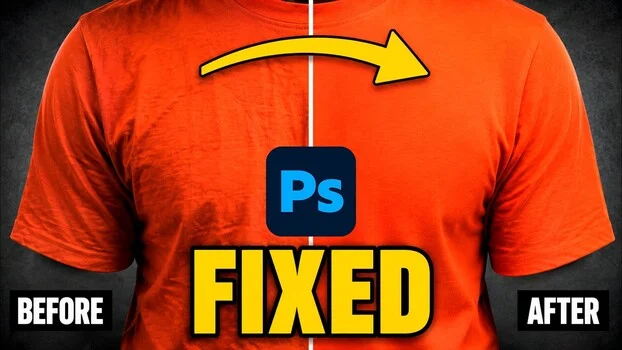
The persistent challenge of unwanted creases, wrinkles, and distracting backdrop imperfections in photographic imagery has long been a bane for photographers and retouchers alike. These seemingly minor flaws, often beyond immediate control during a shoot, can significantly detract from the professional aesthetic of a portrait or product shot, demanding hours of meticulous manual correction in post-production. Renowned photographic educator and Adobe Certified Expert, Glyn Dewis, recently demonstrated a groundbreaking methodology utilizing the latest advancements in Adobe Photoshop’s generative artificial intelligence (AI) to dramatically streamline and enhance the process of eliminating such visual disturbances. His innovative approach, showcased at the Wex Photo Video road shows, heralds a new era of efficiency and precision in image retouching, effectively transforming a traditionally laborious task into a remarkably swift and sophisticated operation.
The Enduring Challenge of Imperfection: A Timeless Problem in Photography
From the crisp lines of a freshly ironed shirt that somehow develops a crease just as the shutter clicks, to the subtle undulations of a fabric backdrop that become pronounced under studio lighting, photographers frequently encounter elements that compromise the pristine quality of their images. For decades, the industry standard for addressing these issues involved painstaking manual work. Retouchers would employ cloning, healing, dodging, and burning techniques, often pixel by pixel, to smooth out fabric, remove wrinkles, and clean up backgrounds. This process, while capable of yielding impeccable results in skilled hands, was inherently time-consuming and resource-intensive, directly impacting project timelines and operational costs for studios and freelance professionals. The demand for perfection in an increasingly visual world, coupled with tighter deadlines, has consistently driven the search for faster, yet equally effective, solutions.
Glyn Dewis: A Pioneer’s Journey from Manual Mastery to AI Integration
Glyn Dewis, a figure celebrated within the photography and retouching communities for his practical expertise and accessible teaching style, is no stranger to the demands of manual retouching. Having spent years meticulously perfecting images by hand, he possesses an intimate understanding of the intricacies and frustrations associated with traditional methods. His endorsement of AI-driven solutions, therefore, carries significant weight, stemming not from a desire to bypass foundational skills, but to leverage technology for greater efficiency without compromising artistic integrity. Dewis’s transition to advocating for AI tools reflects a broader industry trend where experienced professionals are actively exploring how artificial intelligence can augment, rather than replace, human creativity and skill.
His demonstration at the Wex Photo Video road shows provided a tangible example of this evolution. These events, pivotal gatherings for photography and videography enthusiasts and professionals across the UK, serve as crucial platforms for showcasing the latest equipment, techniques, and software innovations. For Dewis to choose this venue to unveil his AI-powered workflow underscored the significance of the shift he was presenting. The road shows attract a diverse audience, from aspiring amateurs to seasoned veterans, all keen to discover tools that can elevate their craft, making it an ideal setting for introducing transformative post-production methodologies.
Unveiling the AI Workflow: A Deep Dive into Photoshop’s Generative Capabilities
Dewis’s method leverages several of Photoshop’s cutting-edge AI features, meticulously combined to create a robust and efficient workflow. His starting point for demonstrating crease removal was a portrait captured at one of the Wex Photo Video events, which, like many live shoots, presented real-world challenges including a distracting logo on the subject’s attire.
-
The ‘Remove’ Tool: Beyond Simple Erasure
Before tackling the creases, Dewis first addressed a prominent logo on the subject’s shirt. For this task, he utilized Photoshop’s ‘Remove’ tool, specifically setting it to ‘Auto.’ This setting allows Photoshop to intelligently decide between leveraging its advanced AI algorithms or its traditional content-aware technology to achieve the best result. This nuanced approach, as Dewis highlighted, is critical; blindly forcing AI on every task is not always the most effective strategy. The ‘Remove’ tool, a testament to Adobe’s continuous development in intelligent content manipulation, has evolved significantly from earlier healing brushes, offering a more contextually aware and seamless removal of unwanted elements, often with a single click or brush stroke. Its ability to analyze surrounding pixels and intelligently fill in gaps has made it an indispensable tool for photographers seeking to clean up minor distractions quickly and effectively. -
Generative Fill with Firefly Image 5: Precision and Power
The core of Dewis’s crease removal technique lies in Adobe’s Generative Fill feature, powered by Firefly Image 5. This generative AI model is specifically engineered not only to create new content but also to edit existing imagery while meticulously preserving original details and textures. For the creases themselves, Dewis employed a loose lasso selection around the affected area of the shirt. The simplicity of his subsequent instruction was striking: a plain text prompt merely stating "remove the creases."The power of Firefly Image 5 was immediately evident in its output. As a premium model, it returned a single, highly refined variation, minimizing the need for the user to sift through multiple, often less-than-ideal, options. At the time of Dewis’s recording, the output resolution for Firefly Image 5 was 2K (approximately 2048 x 2048 pixels), a resolution Dewis deemed entirely sufficient for clothing that isn’t heavily detailed. This specific resolution, while adequate for many applications, underscores an ongoing conversation within the industry regarding the need for higher-resolution generative outputs as AI models continue to advance and integrate into professional workflows demanding print-ready quality. Industry trends indicate a consistent demand for higher fidelity, with many professional photographers and retouchers working with images upwards of 4K or even 8K, suggesting that future iterations of Firefly will likely push these resolution boundaries.
Dewis also referenced Flux.2 Pro, another partner model available through Photoshop, as his previous go-to for similar tasks. He lauded Flux.2 Pro for its strength in specific, complex scenarios, such as removing reflections from glasses while impeccably preserving the integrity of the frames and the eyes beneath them. This highlights the growing ecosystem of specialized AI models, each excelling in particular retouching challenges, offering photographers a versatile toolkit.
-
Navigating Technical Nuances: Resolution and Model Selection
The choice of Firefly Image 5 as a premium model, and its output characteristics, offer insight into the current state and future trajectory of generative AI in creative applications. The "premium" designation typically implies enhanced accuracy, finer detail preservation, and potentially faster processing, justifying a more streamlined single-variation output. The 2K resolution, while acceptable for web use, social media, and certain print sizes, signals that while generative AI is profoundly capable, its integration into high-end print production still requires careful consideration and, at times, supplementary traditional retouching or upscaling techniques. The market for AI-powered upscaling tools, for instance, has seen significant growth, with solutions from companies like Topaz Labs and Gigapixel AI becoming popular complements to generative editing.
Mastering the Art of Prompt Engineering: The ‘Guardrails’ Approach
Perhaps the most significant takeaway from Dewis’s demonstration, one that transcends the specific task of wrinkle removal, is the critical importance of meticulous prompt engineering. Generative AI models are powerful, but their efficacy is directly proportional to the clarity and specificity of the user’s instructions. A vague prompt will often yield unpredictable, or even undesirable, results.
-
The Importance of Specificity: Naming the Target
Dewis underscored this point with a practical example: when selecting a white t-shirt using the Object Selection tool, he demonstrated that a generative fill prompt lacking a specific target (e.g., just "remove creases" without mentioning "shirt") would yield no action. This illustrates a fundamental principle of interacting with generative AI: even when a selection is active, explicitly naming the target object within the text prompt is paramount for the model to understand the intended area of operation and desired outcome. This precision in prompting ensures that the AI focuses its generative efforts on the intended element, preventing extraneous or incorrect modifications. -
Preserving Detail: A Crucial Instruction
The concept of "guardrails" in prompt engineering emerged as a cornerstone of Dewis’s technique. When addressing creases in a vintage gray Westcott X-Drop Pro backdrop, he didn’t simply instruct the model to "remove creases." Instead, he added crucial caveats: "do not change the look of it," and "keep the texture and canvas effect." This single sentence proved to be the difference between a successful, natural-looking repair and a smeared, plasticky, and ultimately unusable backdrop.Generative models, by their nature, tend towards simplification unless explicitly instructed otherwise. Without these guardrails, they might interpret "remove creases" as an instruction to flatten the entire surface, erasing not just the wrinkles but also the inherent texture, grain, or artistic effects of the material. This principle extends across all generative editing tasks: whether refining a shirt, cleaning a wall, or altering a sky, informing the model what to preserve in addition to what to remove is essential for achieving predictable, high-quality, and aesthetically consistent results. This "what to remove and what to preserve in the same breath" approach is a habit Dewis advocates for all generative edits, fundamentally shifting the user’s interaction from simple command to nuanced collaboration with the AI. This analytical approach to prompt construction elevates it from a mere instruction to a sophisticated form of dialogue with advanced algorithms.
Overcoming AI’s Current Limitations: Dewis’s Ingenious Workarounds
While generative AI offers unprecedented capabilities, it is not without its current limitations. One challenge highlighted by Dewis is Photoshop’s current lack of integrated feather and edge sliders for cleaning up AI masks, features that are now standard in Camera Raw and Lightroom for refining traditional masks. This absence can lead to AI mask edges appearing "crispy" or unnaturally sharp, a subtle but critical flaw in professional retouching.
To circumvent this, Dewis demonstrated an ingenious workaround involving a Gaussian blur. By applying a controlled Gaussian blur to the AI mask, he effectively softened its edges, achieving a more natural blend with the surrounding imagery. This extra step, while adding a minor procedural element, showcases the adaptability of experienced retouchers who can combine traditional Photoshop techniques with new AI functionalities to achieve optimal results. It also implicitly signals an area for future development within Adobe Photoshop, as tighter integration of mask refinement tools would further streamline the AI-driven workflow.
Broader Industry Context: The Wex Photo Video Showcase and Adobe’s Vision
Dewis’s demonstration at the Wex Photo Video road shows wasn’t just about a new technique; it was a microcosm of a larger industry shift. Wex Photo Video, as a leading retailer and industry influencer, plays a vital role in educating its customer base about emerging technologies. Showcasing AI-powered workflows validates the technology and encourages adoption among a professional audience.
Adobe’s commitment to generative AI, particularly through its Firefly family of models, is central to this transformation. The company has invested heavily in developing ethical, commercially viable AI tools that empower creatives. Firefly, initially launched as a standalone suite of creative generative AI models, has been progressively integrated into core Adobe applications like Photoshop, Illustrator, and Express. This strategy ensures that Adobe users have access to cutting-edge AI capabilities directly within their familiar creative environments, minimizing friction and accelerating workflow adoption. The continuous evolution of models like Firefly Image 5, with its focus on detail preservation and refined outputs, reflects Adobe’s understanding of professional demands for precision and quality. The company’s vision is clearly to make complex creative tasks more accessible and efficient, allowing artists to focus more on conceptualization and less on repetitive manual adjustments.
The Shifting Landscape of Post-Production: Implications for Photographers and Retouchers
The implications of Glyn Dewis’s AI-powered workflow extend far beyond simply fixing wrinkles. They point to a fundamental reshaping of the post-production landscape.
-
Efficiency and Creative Freedom: The most immediate benefit is a dramatic increase in efficiency. Tasks that once consumed hours can now be completed in minutes, freeing up photographers and retouchers to allocate their time to more creatively fulfilling or technically demanding aspects of their work, such as color grading, complex composites, or client communication. This efficiency translates directly into cost savings for studios and increased capacity for freelancers. A study by McKinsey & Company on AI adoption in creative fields projected significant time savings, with some tasks seeing a reduction of up to 50-70% in completion time, directly impacting profitability and project throughput.
-
Evolving Skill Sets: From Manual Dexterity to AI Orchestration: The shift necessitates an evolution in skill sets. While foundational knowledge of photography and retouching principles remains crucial, the emphasis is increasingly moving from purely manual dexterity to the strategic orchestration of AI tools. Understanding how to effectively prompt generative models, how to integrate AI outputs with traditional techniques, and how to troubleshoot AI limitations becomes paramount. This doesn’t devalue the role of the retoucher but rather elevates it, transforming them into "AI whisperers" or "creative engineers" who leverage advanced algorithms to realize their artistic visions more rapidly and effectively. This evolution requires continuous learning and adaptation, as AI technology itself is advancing at an unprecedented pace.
-
The Future of Flawless Imagery: As AI models become more sophisticated, the pursuit of "flawless" imagery becomes more attainable and democratized. What once required a highly specialized and expensive retoucher might soon be achievable by a wider range of creatives. This democratized access to advanced tools could foster greater creative experimentation and elevate the overall quality of visual content across various industries, from e-commerce to editorial photography. However, it also raises important discussions around authenticity and the ethical implications of creating images that are "too perfect," potentially setting unrealistic standards. Adobe, for its part, has been proactive in addressing these concerns, embedding content authenticity initiatives and developing provenance features within its AI tools to provide transparency about AI-generated or modified content.
In conclusion, Glyn Dewis’s comprehensive demonstration of an AI-powered workflow for crease and background removal in Photoshop is more than just a tutorial; it’s a powerful affirmation of the transformative potential of generative AI in professional photography. By meticulously combining intelligent selection tools, powerful generative models like Firefly Image 5, and the critical art of precise prompt engineering, Dewis has charted a clear path towards a future where the tedious aspects of retouching are dramatically minimized, allowing creativity to flourish unhindered. His "guardrails" approach to prompting, emphasizing both removal and preservation, stands as a vital lesson for anyone navigating the burgeoning landscape of AI-assisted creative work. As AI continues to evolve, the ability to effectively communicate with these powerful algorithms, understanding their strengths and limitations, will define the next generation of photographic excellence and post-production efficiency.
