
 By Nila Kartika Wati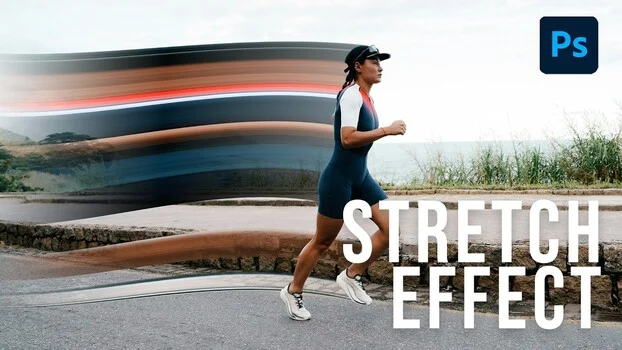
The pixel stretch effect, a visually arresting technique previously associated with high-budget advertising campaigns and sophisticated graphic design, has been demystified and made accessible through a straightforward workflow within Adobe Photoshop. This method offers a potent tool for photographers and digital artists seeking to imbue portraits, product shots, and a variety of visual content with a sense of motion, energy, or a distinct graphic edge, achievable in a matter of minutes. Its emergence highlights a broader trend in digital artistry towards effects that blend photographic realism with graphic abstraction, pushing the boundaries of visual storytelling in an increasingly dynamic media landscape.
A New Paradigm in Digital Motion Simulation
At its core, the pixel stretch effect provides a compelling alternative to traditional in-camera motion-faking techniques such as panning blur, radial zoom blur, or slow-shutter trails. While these classic photographic methods require specific shooting conditions and often result in a generalized blur, the pixel stretch is engineered entirely in post-production, leveraging existing image data. This crucial distinction means the resulting streaked effect precisely carries the actual colors and tonal values of the subject, creating a more integrated and believable, albeit stylized, sense of speed and direction. This characteristic makes it particularly effective across a diverse range of subjects, from dynamic sports photography and expressive dance imagery to sleek automotive shots and conceptual editorial layouts where implied direction and graphic punch are paramount.
The detailed, step-by-step methodology for implementing this effect has been comprehensively outlined by Aaron Nace of Phlearn, a prominent figure in online Photoshop education known for his ability to break down complex techniques into manageable processes. Nace’s tutorial, which demonstrates the effect’s application across three distinct sample images, serves as a cornerstone resource for creatives looking to integrate this powerful visual element into their portfolios and projects. Phlearn, with its extensive library of tutorials, has consistently played a significant role in democratizing advanced digital imaging techniques, making them accessible to a broad audience ranging from aspiring enthusiasts to seasoned professionals seeking to expand their skill sets. The platform’s commitment to practical, actionable instruction has fostered a community of learners capable of executing sophisticated visual effects with relative ease.
Deconstructing the Workflow: Precision and Intentionality
The technical execution of the pixel stretch effect, as demonstrated by Nace, is surprisingly efficient, relying on a judicious combination of Photoshop’s core functionalities. The process commences with subject isolation, a fundamental step in many advanced compositing workflows. Utilizing tools like "Select Subject" from Photoshop’s contextual taskbar, or the "Object Selection tool" for specific objects, the primary subject is accurately delineated. This isolated subject is then duplicated twice (Command/Control + J), creating three identical layers. This layering strategy is critical, as the middle layer is designated as the "workhorse" for the stretching operation, preserving the original subject on the bottom layer and allowing for strategic overlay on the top.
The pivotal tool in this technique, and arguably the most overlooked by many Photoshop users, is the single-column marquee. Typically, users gravitate towards rectangular or elliptical marquees for broader selections. However, the single-column marquee, designed to select a solitary, one-pixel-wide vertical strip, is the foundational element that enables this distinctive effect. Its precision in isolating a minuscule segment of the image is what allows for the subsequent controlled manipulation that defines the pixel stretch. Once this narrow column of pixels is selected, often strategically chosen from a leading edge or a point of implied motion on the subject, the transformation begins.
The "Transform" command (Command/Control + T) is then applied. By holding down the Command or Control key while dragging outward from the selected pixel strip, Nace demonstrates how this single line of pixels smears across the frame, creating an initial, clean streak. This raw stretch, while functional, lacks the organic flow and depth characteristic of high-end visual effects. This is where the "Warp" transformation comes into play. Upon right-clicking during the transform operation and selecting "Warp," the user gains granular control over the streak’s form. The Warp tool, presenting a customizable grid, allows for intuitive manipulation, enabling the designer to push the streak up, down, or from its center. This capability is what transitions the effect from a flat, linear drag into a dynamic, three-dimensional element, imparting a sense of soft fade and depth that elevates its visual appeal significantly. The ability to sculpt the streak with Warp is crucial for avoiding a rigid, artificial look, instead allowing it to mimic natural motion blur patterns or stylized graphic sweeps.
Further refinement is achieved through the integration of a layer mask and the Gradient tool. A layer mask is applied to the warped streak layer, providing non-destructive control over its visibility. Subsequently, a foreground-to-transparent gradient, typically set with black as the foreground color, is applied to this mask. This technique allows the streak to dissolve precisely where desired, often fading seamlessly into the background or the subject itself. This level of control over the effect’s attenuation is a hallmark of professional execution, distinguishing a sophisticated visual treatment from a simplistic, gimmicky application. It ensures that the stretch complements the image rather than overpowering it, allowing for a nuanced integration that enhances the overall composition.
Strategic Layering and Subject Versatility
The decision regarding which layer sits atop the composition is where the pixel stretch effect truly demonstrates its adaptability across different subjects and creative intentions. Nace’s tutorial illustrates this through practical examples. In the case of a running athlete, the stretch is initiated from the forward foot, creating a streak that trails dynamically behind the rear foot. When the top subject layer is toggled on and positioned appropriately, the entire composition conveys a compelling sense of three-dimensional motion, rather than a flat, two-dimensional filter effect. The subtle interplay between the stretched pixels and the original subject can be further refined by adjusting the opacity of the top subject layer, allowing for a controlled bleed-through or a clean separation, depending on the desired artistic outcome.
The versatility of the technique extends beyond human subjects. Nace’s third example, featuring a tiny car, conclusively demonstrates that the same principles apply equally effectively to inanimate objects. In this instance, the "Object Selection tool" with a simple rectangular drag replaces "Select Subject," proving the method’s broad applicability. This adaptability underscores the pixel stretch as a universally useful tool for any photographer or designer aiming to introduce dynamism to static subjects.
Historical Context and Modern Relevance
The pixel stretch effect is not an isolated phenomenon but rather a contemporary evolution within a long tradition of motion-faking techniques employed in photography. For decades, photographers have grappled with the challenge of conveying speed and movement in a medium that inherently freezes action. Techniques like panning blur, where the camera tracks a moving subject to blur the background while keeping the subject relatively sharp, and radial zoom blur, which involves zooming the lens during a slow exposure, have been mainstays for imbuing still images with kinetic energy. Similarly, slow-shutter trails capture the path of light or movement over time, creating ethereal streaks.
What differentiates the pixel stretch approach is its digital genesis and its reliance on existing pixel data. Unlike traditional methods that can be unpredictable and require specific in-camera settings, the pixel stretch is a post-production construct. This means the resulting streak is not a generic blur but a direct extrapolation of the subject’s actual colors and textures. This fidelity to the source material ensures that the effect remains harmoniously integrated with the image, lending it an authenticity that generic blurs might lack. This characteristic makes it particularly suitable for applications where color accuracy and brand consistency are important, such as in advertising and product photography.
The rise of digital content creation, particularly for social media, online editorial platforms, and album art, has created an insatiable demand for visually striking and unique imagery. In this context, where a strong graphic punch often takes precedence over strict photographic realism, the pixel stretch effect offers a valuable addition to a creative professional’s toolkit. Data from various marketing analytics firms consistently shows that visual content significantly outperforms text-only content in terms of engagement, shareability, and recall. For instance, studies by HubSpot indicate that visual content is 40 times more likely to get shared on social media than other types of content. Furthermore, businesses that use visual content in their marketing campaigns see a 12% higher growth rate than those that don’t. These statistics underscore the critical importance of visually dynamic techniques like the pixel stretch in contemporary digital marketing and communication strategies.
Broader Implications and Creative Empowerment
The availability and accessibility of sophisticated techniques like the pixel stretch, largely through comprehensive tutorials from platforms like Phlearn, have profound implications for the creative industry. Firstly, they contribute to the democratization of high-end design. What once required specialized software knowledge or extensive experimentation can now be learned and applied by a wider audience, fostering greater creative output and innovation. This empowerment allows individual artists and small businesses to produce content that rivals the quality of larger agencies, leveling the playing field in competitive markets.
Secondly, the pixel stretch exemplifies a trend towards hybrid visual storytelling, where photography and graphic design seamlessly merge. This fusion is increasingly prevalent in modern visual culture, from interactive web design to motion graphics and augmented reality. The principle demonstrated – that a single row or column of pixels, when transformed, warped, and judiciously masked, can generate dynamic motion in any chosen direction – is a powerful concept extending beyond this specific effect. It encourages designers to think about image data as a malleable resource, capable of being reinterpreted and repurposed to convey new meanings and sensations.
Furthermore, the efficiency of this technique contributes to streamlined creative workflows. In fast-paced industries like advertising and social media, the ability to generate impactful visual effects quickly without compromising quality is a significant advantage. It allows creative teams to iterate faster, experiment more freely, and meet demanding deadlines while still delivering visually compelling results.
In conclusion, the pixel stretch effect, championed by educators like Aaron Nace, represents more than just a clever Photoshop trick. It is a testament to the evolving capabilities of digital imaging software and the ingenuity of its practitioners. By offering a straightforward yet powerful method to introduce dynamic motion and graphic intensity, it equips designers and photographers with a versatile tool that addresses contemporary demands for visually engaging content. Its ability to seamlessly blend color fidelity with abstract motion underscores its potential to become a staple in the creative toolkit for anyone seeking to add a professional, energetic, and visually distinctive edge to their digital imagery. The underlying lesson, that meticulous control over seemingly minor elements like a single pixel column can yield dramatically sophisticated results, is a principle worth carrying forward into all facets of digital art and design.
