 By admin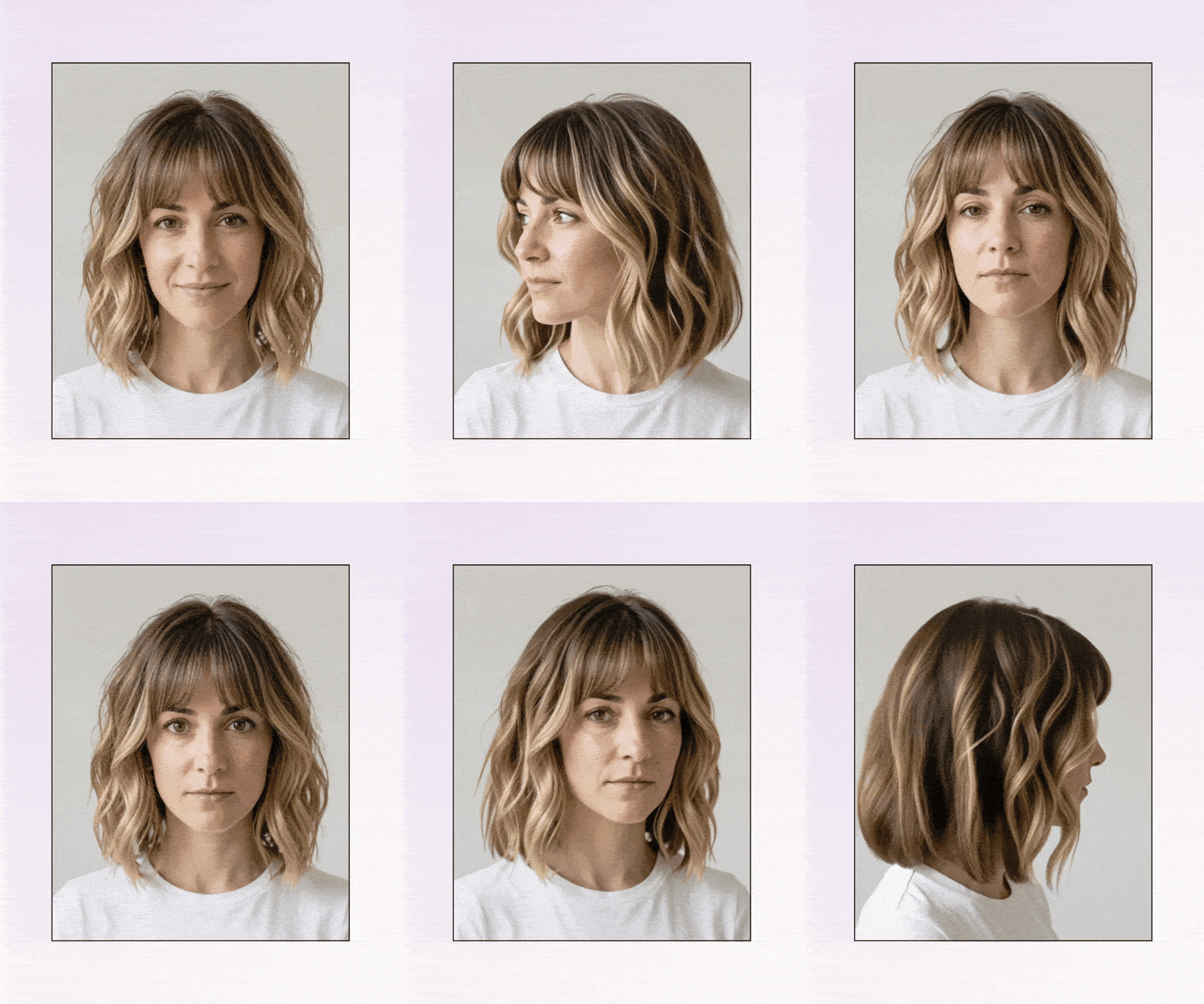
The quest for the perfect hair shade can be a daunting and expensive endeavor. With salon color services often ranging from $150 to $300, a misstep can lead to significant financial regret. The common scenario of bringing inspiration photos to a stylist, only to find the result drastically different from the envisioned outcome, highlights the need for reliable preview tools. Fortunately, a new generation of mobile applications for iPhone users aims to bridge this gap, offering realistic hair color previews before any commitment is made. This comprehensive analysis explores the top seven iOS hair color apps, evaluating their effectiveness, realism, and utility as decision-making tools.
Defining a Truly Useful Hair Color Application
While many virtual hair color apps exist primarily for entertainment, a select few are engineered to assist users in making informed decisions. The effectiveness of these applications hinges on four critical factors: the accuracy of the color rendering, the realism of the hair texture and lighting, the ability to visualize a complete transformation (including potential style adjustments), and the app’s suitability as a genuine decision-making tool rather than just a novelty.

The technical distinction between Augmented Reality (AR) hair color apps and those offering complete transformation rendering is significant. AR tools apply color in real-time via a live camera feed, often resulting in a glossy, filtered appearance. Complete transformation rendering, conversely, aims to present a fully styled outcome, integrating color, cut, and texture to simulate a salon-finished look. While most apps fall into the first two categories, the most valuable for serious consideration are those that achieve the third.
Methodology: Rigorous Testing of Top iOS Hair Apps
To identify the leading hair color applications for iPhone, a systematic testing process was undertaken. Several apps were downloaded onto the latest iPhone models, and identical front-facing selfies were uploaded to each. The same range of popular and experimental colors was then applied across all seven applications to facilitate a direct comparison. This rigorous evaluation aimed to pinpoint the apps that offer the most realistic previews and possess features that genuinely aid in decision-making.
The Top 7 Hair Color Apps for iPhone: A Ranked Analysis

The effectiveness of hairstyle and hair color apps often depends on whether they are designed for casual amusement or for practical application. The following list presents the top seven iPhone hair color apps, evaluated based on their performance in realism, their utility as decision tools, the availability of free options, and their specific strengths.
Quick List: Top 7 Apps at a Glance
| APP | REALISM | DECISION TOOL? | FREE OPTION | BEST FOR |
|---|---|---|---|---|
| L’Oréal My Hair [iD] | High | Partial | Yes | Brand-specific salon planning |
| HairHunt (by TheRightHairstyles) | High | Yes | Yes | Real salon decisions |
| PhotoDirector | Medium-High | Partial | Yes (limited) | General editing + hair |
| YouCam Makeup | Medium | Entertainment | Yes (watermarked) | Wild colors, social sharing |
| Fotor | Medium | No | Yes | Quick casual experiments |
| FaceApp | Medium | No | Yes (limited) | Broad transformation play |
| Dye My Hair | Low (natural) | No | Yes | Fantasy/vivid colors only |
1. L’Oréal My Hair [iD]
Leveraging the extensive professional product line of L’Oréal, the My Hair [iD] app offers a distinct advantage: the colors previewed are directly tied to formulas that salons can actually use. This integration of professional product data sets it apart from generic color overlay applications.

However, the app’s primary limitation is its confinement to L’Oréal’s product range. Users not loyal to the brand might find the color selection restrictive. Despite this, for individuals specifically considering L’Oréal shades, it stands as a robust virtual hair color application.
- Best for: Planning a salon appointment with a stylist who utilizes L’Oréal professional products.
- Honest con: Users are restricted to the L’Oréal brand’s color universe.
2. HairHunt (by TheRightHairstyles)
Building on over a decade of experience in assisting women with hair color previews, TheRightHairstyles’ HairHunt app is meticulously designed to empower confident decision-making. Its core innovation lies in presenting color and hairstyle together as a complete hair transformation, moving beyond simple color overlays to simulate a realistic, post-salon look.
The processing time is remarkably swift, typically under 10 seconds, and the app features a curated palette of salon-realistic shades that are regularly updated. HairHunt distinguishes itself by offering a personalized hair quiz and a hair diary for tracking style experiments. While it eschews overtly fantastical colors, it excels at demonstrating how realistic salon shades would appear on an individual.

- Best for: Individuals seeking a commitment-free way to preview complete hair transformations, focusing on realistic, styled outcomes rather than mere color overlays.
- Honest con: It does not offer a standalone color-only option; color and cut are presented together. In-app side-by-side comparisons are not available.
3. PhotoDirector
PhotoDirector has emerged as a surprisingly capable AI hair color application, particularly for users who also seek comprehensive photo editing tools within a single platform. Its AI detection is robust, adeptly handling complex images with layered backgrounds and challenging lighting conditions, outperforming many competitors. The app’s optimization for iPhone ensures a smooth user experience, solidifying its position among essential beauty apps.
The trade-off for this versatility is that hair color is one feature among many general editing options, which can make the experience feel less specialized than dedicated hair color simulators. Furthermore, accessing the app’s more advanced capabilities may require a subscription and involve a learning curve.
- Best for: Users who desire integrated hair try-on functionality alongside broader photo editing capabilities.
- Honest con: Lacks the specialized focus required to serve as a definitive hair decision-making tool.
4. YouCam Makeup

YouCam Makeup boasts an extensive library of over 150 colors and offers a live AR hair color try-on feature with smooth iPhone performance. Its intuitive user interface allows for instant color switching, making it an ideal choice for experimenting with vivid or fantasy shades.
However, its reliability for natural, salon-like color decisions is less pronounced. In testing, the copper shade appeared artificially glossy, resembling an Instagram filter more than actual dyed hair. In contrast, HairHunt’s copper preview demonstrated how the color would interact with styled layers, showcasing realistic depth and dimension.
- Best for: Exploring vibrant and unconventional colors, creating social media content, and engaging in casual experimentation.
- Honest con: Tends to function more as a filter than a precise decision tool for natural tones, often producing artificially shiny results.
5. Fotor
Fotor offers a unique approach by allowing users to describe their desired color using text prompts, such as "make my hair warm auburn." The AI then interprets these descriptions, providing an engaging method for experimentation, especially for those unsure of precise color terminology. Both the web and app versions perform reasonably well on iPhones, serving as a useful tool for casual exploration of hair color ideas.

However, the accuracy of the results can vary compared to specialized applications. As Fotor is primarily a general photo editor, its hair color feature feels more like an added benefit than a meticulously optimized experience.
- Best for: Quick, casual experiments and users who prefer text-based prompts for color selection.
- Honest con: Results can be inconsistent, particularly for nuanced shades like ash blonde or strawberry blonde.
6. FaceApp
Renowned for its viral transformation effects, including age and gender alterations, FaceApp’s hair tools are part of a broader suite of features. It provides 13 distinct hairstyle options alongside hair color changes, all within an easily navigable interface. As a free iPhone beauty app, it offers considerable scope.
Despite its accessibility, premium features are often locked behind a subscription, and the hair color results lean more towards stylized entertainment than realistic previews.

- Best for: Budget-conscious users seeking simple and broad previews of hair color transformations.
- Honest con: Many of the most useful features require a premium subscription, and results often appear stylized rather than natural.
7. Dye My Hair
Haircut Filter Dye My Hair excels in a specific niche: fantasy and vivid colors. It is the go-to application for exploring colors like purple, blue, rainbow, and neon shades, delivering genuinely impressive results for these unconventional hues.
While it serves as an excellent tool for non-natural shades and editorial content, it falters significantly when attempting to simulate natural salon colors. For those considering pastels, a dedicated pastel hair try-on guide is recommended before committing.
- Best for: Experimenting with fantasy hair colors, creating editorial content, and planning costume designs.
- Honest con: Ineffective for natural color simulations; primarily designed for entertainment.
Maximizing Hair Color App Results: Best Practices

The quality of the input photo is paramount to achieving accurate results from any hair color application. Blurry selfies or those taken in poor lighting can lead to misleading previews, setting unrealistic expectations for salon visits.
- Optimal Lighting: Natural daylight is crucial. Position yourself near a window or step outside to eliminate shadows that can confuse AI algorithms.
- Hair Visibility: Ensure your hair is down and fully visible, allowing the app to accurately map its length, texture, and volume.
- Minimal Makeup: If possible, opt for minimal makeup to allow the system to focus accurately on your hair during the color testing process.
- Current Hair Condition: Be mindful that existing box dyes, highlights, or brassiness in your hair will influence how any new color appears in reality. Apps cannot fully replicate these complex chemical interactions.
Bridging the Gap: Hair Color App Previews vs. Real-Life Outcomes
While no app can replace a professional consultation with a colorist, virtual hair color applications serve a vital role in identifying color directions that resonate with users and providing concrete visual aids for salon discussions. These apps offer a glimpse of the desired destination, leaving the stylist to chart the course.
It is important to understand the inherent differences between on-screen previews and real-life results. Factors such as hair porosity, the underlying pigment of your current color, and how the chosen shade will fade over time are variables that apps cannot precisely predict. Applications that render complete hairstyle and color combinations tend to offer more realistic previews because they illustrate how color interacts with cut and texture, a dimension flat overlays often miss.

Choosing the Right Hair Color App for Your Needs
Most users will find that one or two applications suffice for their needs. The selection process should be guided by the user’s primary objective:
- For Vivid or Fantasy Colors: YouCam Makeup offers the most extensive library and a seamless live camera experience for bold shades, making it ideal for entertainment and social media content.
- For Realistic, Styled Previews: HairHunt stands out as a superior decision-making tool. Its personalized hair quiz and diary, combined with realistic, styled results, make it the top choice for individuals preparing for actual salon appointments.
- For L’Oréal Product Users: My Hair [iD] provides professional formula-matched previews with commendable 3D rendering, specifically tailored for those planning L’Oréal color services.
- For Integrated Editing: PhotoDirector offers the convenience of hair color try-ons alongside comprehensive photo editing tools, eliminating the need to switch between applications.
- For Quick, Casual Exploration: Fotor’s text-prompt approach provides a low-friction and rapid method for exploring hair color ideas without an emphasis on strict accuracy.
Frequently Asked Questions About Hair Color Apps
-
What is the best free hair color app for iPhone?
YouCam Makeup offers a comprehensive free experience (albeit with a watermark). For realistic, styled previews that aid in decision-making, HairHunt provides a free trial of its realistic transformations.
-
Can hair color apps show accurate results?
Apps provide realistic previews, but they cannot account for individual hair texture, porosity, or underlying pigments. Results should be used as guidance, not definitive predictions. -
What hair color app shows the most realistic results?
Apps that integrate color with complete hairstyle renderings, like HairHunt, tend to appear more realistic than simple color overlays, as they better simulate how color interacts with a styled cut and texture. This makes HairHunt a leading realistic hair color app for salon planning. -
Do hair color apps work on all hair types?
Most apps perform best on straight to wavy hair. Curly and textured hair may yield less accurate results due to limitations in AI training data, a common challenge across current iOS hair applications. -
Is there a hair color app with a 360-degree video preview?
HairHunt is slated to introduce a 360° video preview in an upcoming update, allowing users to view different hair colors from multiple angles. This feature is currently available on its web version.
-
Should I show the stylist my hair color app results?
Absolutely. Screenshots serve as invaluable visual references, communicating your vision more effectively than verbal descriptions and providing your colorist with a clear starting point.
In conclusion, the frustration of repeated incorrect hair color choices can be significantly mitigated by leveraging modern mobile technology. By utilizing apps that offer complete, styled previews—rather than mere color overlays—users can gain a tangible understanding of potential transformations. HairHunt, in particular, represents the closest approximation to a salon mirror experience without the financial risk, allowing users to confidently explore shades like copper, platinum, or burgundy before making a commitment. Download it on your iPhone today to embark on your hair color journey with newfound confidence.