
 By Nila Kartika Wati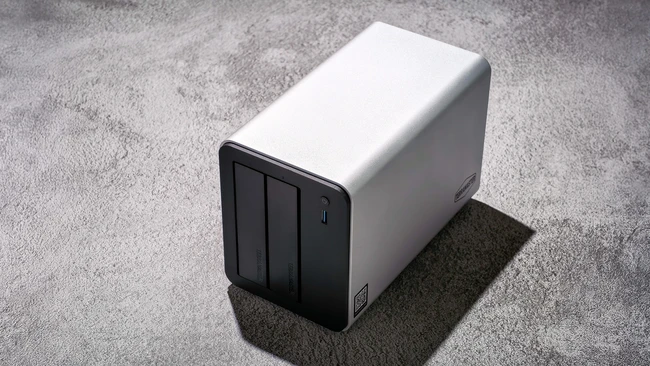
In recent years, Network Attached Storage (NAS) devices have quietly but definitively reasserted their critical relevance, particularly within the demanding ecosystems of photographers, videographers, and small creative teams. This resurgence is not merely a nostalgic return to local storage but a pragmatic response to evolving digital landscapes, primarily driven by escalating cloud storage costs, growing concerns over data ownership and privacy, and a renewed appreciation for high-performance, accessible local infrastructure. Modern NAS technology, exemplified by units like the TerraMaster F2-425 Plus, has dramatically improved in affordability and user accessibility, bridging the gap between enterprise-grade capabilities and consumer-friendly implementation. The F2-425 Plus enters this competitive arena as an "affordable flagship hybrid NAS," a designation that speaks to its ambition to combine high-speed networking, flexible NVMe expansion, and a streamlined setup experience – features once exclusively reserved for significantly more expensive, complex systems. This comprehensive review delves into how effectively the TerraMaster F2-425 Plus delivers on this promise, scrutinizing its physical design, hardware architecture, performance benchmarks, software experience, and its practical utility as an indispensable storage solution for working professionals.
The Evolving Landscape of Data Storage: Why NAS is Back in Focus
The digital age has seen a pendulum swing in data storage strategies. Initially, local hard drives were king, followed by a widespread migration to cloud services promising ubiquitous access and simplified backups. However, the honeymoon period with the cloud has given way to a more nuanced perspective. Recurring subscription fees for large capacities have become a significant operational overhead for professionals, especially those managing vast libraries of high-resolution images and video files. Furthermore, questions surrounding data sovereignty, potential vendor lock-in, and the inherent latency of internet-dependent access have prompted a reevaluation.
This shift has created fertile ground for advanced NAS devices. For creative professionals, a NAS offers a centralized, high-performance repository that combines the accessibility of cloud storage with the control and speed of local drives. It empowers users to own their data outright, implement robust backup strategies without third-party reliance, and facilitate seamless collaboration within small teams. The TerraMaster F2-425 Plus is positioned to capitalize on this trend, offering a compelling blend of features designed to meet these specific needs without prohibitive investment.
TerraMaster F2-425 Plus: A Deep Dive into Hardware and Design
Upon unboxing, the TerraMaster F2-425 Plus immediately conveys a sense of robust construction. Despite its relatively compact dimensions—approximately 150 mm x 122 mm x 219 mm—and a net weight of around 2.2 kg, the unit feels substantial, signaling a focus on durability over lightweight, cost-saving alternatives. The primary chassis, which envelops the core components, is crafted from a 3 mm aluminum-alloy casing. This material choice is strategic; aluminum is renowned for its high thermal conductivity, efficiently drawing heat away from internal components and dissipating it into the surroundings. The inclusion of alloy mitigates aluminum’s natural softness, contributing significantly to the device’s overall sturdiness and rigidity. The exterior surface features a slightly rough, utilitarian texture, a finish that extends consistently to its plastic components. While this aesthetic prioritizes functionality over a polished, premium facade, it seamlessly integrates into typical workspace or studio office environments.
Connectivity and Cooling: The Backbone of Performance
The F2-425 Plus adopts a minimalist approach to its front panel, featuring only a power button, a single 10 Gbps USB 3.2 Gen 2 Type-A port for convenient front-access transfers, and three clear LED indicators for system power and the status of the two installed hard drives. While the drive trays themselves are unlabeled, TerraMaster thoughtfully includes sticker labels, allowing users to maintain clear organization. The absence of an additional front-facing USB-C port is a minor omission in an increasingly USB-C centric world, though not a deal-breaker.
The rear panel serves as the central hub for all essential connectivity. A large exhaust fan dominates this section, underscoring the unit’s thermal management design. Accompanying it are an HDMI port, two 5 GbE Ethernet ports, a 10 Gbps USB-C port, and two additional 10 Gbps USB 3.2 Gen 2 Type-A ports, alongside the power input. Critically, TerraMaster has bypassed the older 1 GbE Ethernet ports, a commendable decision that aligns with the device’s performance tier and price point. The inclusion of a power adapter and a LAN cable in the box ensures users can initiate setup immediately, without needing to acquire additional accessories.
Cooling is managed by a single, generously sized rear fan, designed to intelligently modulate its speed based on system load. In practical use, the noise levels are remarkably low; the NAS remains barely audible even when positioned in close proximity to the user. A notable design consideration, however, is the absence of dust filters, which necessitates periodic cleaning to prevent dust accumulation and potential airflow restrictions over time. The unit is supported by four rubber feet on its base, effectively dampening vibrations and slightly elevating the chassis to facilitate improved airflow and heat dissipation.
Storage Flexibility: A Hybrid Approach to Data Management
The F2-425 Plus offers remarkable versatility in its drive bay design. Installing 3.5-inch hard drives is a tool-free process: users simply slide open the bay, detach the plastic holders, mount the drive, reattach the holders, and slide the tray back into position. The trays exhibit reasonable sturdiness, and drives slide smoothly into place. While the plastic attachment holders might raise minor long-term durability concerns, their simple, generic design suggests potential for aftermarket replacements or even 3D-printed alternatives. Drive access is highly convenient, and when configured with TerraMaster’s TRAID system, the F2-425 Plus supports hot-swapping, provided the replacement drive is of equal or greater capacity—a crucial detail for future-proofing and upgrades.
Accessing the M.2 NVMe slots and RAM, however, requires a more involved process. These components necessitate disassembling the entire casing by removing two bottom screws, a somewhat cumbersome procedure. A dedicated access panel would significantly enhance user-friendliness, particularly for those planning memory or cache drive upgrades over the device’s lifespan.
Core Specifications and Processing Power: The Engine Within
At the core of the TerraMaster F2-425 Plus lies an Intel N150 quad-core processor, capable of boosting up to 3.6 GHz. While this CPU is not engineered for intensive enterprise-grade workloads, its performance is more than adequate for the target demographic. In typical day-to-day operations, the system remains highly responsive, even when handling light multi-user access involving file transfers, background backups, media indexing, or running concurrent lightweight services. This is a significant leap forward, especially when paired with 8 GB of DDR5 memory, which is expandable up to 32 GB. The transition to DDR5 from the DDR4 utilized in earlier TerraMaster systems provides a noticeable boost in multitasking efficiency and responsiveness, particularly when dealing with larger datasets common in creative workflows.
One of the F2-425 Plus’s standout features is its hybrid storage architecture. It supports two 3.5-inch or 2.5-inch SATA drives, complemented by three M.2 2280 NVMe SSD slots (PCIe 3.0 x1). This configuration empowers users to craft a storage solution that optimally balances capacity, speed, and cost, avoiding the limitations of single-approach designs. Fully populated, the system can accommodate up to 84 TB of total storage (2 x 30 TB HDDs and 3 x 8 TB NVMe SSDs). The NVMe slots offer diverse configuration options: as a high-speed SSD storage pool (including a RAID 5 configuration across the SSDs), or as cache drives to accelerate traditional hard disk performance. This inherent flexibility makes the F2-425 Plus exceptionally well-suited for demanding workflows involving expansive photo libraries, 4K video editing, or virtualized environments where rapid random access is paramount.
RAID, TRAID, and Storage Expansion: Safeguarding and Optimizing Data
TerraMaster provides an extensive array of storage configuration options, including Single Disk mode, traditional RAID levels (0, 1, 5, or 10), and its proprietary TRAID system. Traditional RAID configurations are most efficient when all drives are identical in size; mixing capacities often leads to wasted space, as usable capacity is dictated by the smallest drive. TRAID addresses this limitation by intelligently optimizing disk layouts, allowing users to combine drives of varying sizes without sacrificing usable capacity. It also offers single-drive redundancy, akin to RAID 5, and significantly simplifies future upgrades by enabling gradual replacement or addition of larger drives without requiring a full array rebuild. This makes TRAID an especially attractive option for users seeking to leverage existing drives or expand storage incrementally.
Network Connectivity and Data Security: Speed and Protection
For network connectivity, the F2-425 Plus features dual 5 GbE Ethernet ports, representing a substantial upgrade from the previous generation’s 2.5 GbE. With link aggregation (LAG) enabled, the system can achieve up to 10 Gbps of aggregated bandwidth, enhancing performance for multi-user access and providing crucial redundancy and failover capabilities. While a dedicated 10 GbE port for single-link transfers is absent, the dual 5 GbE setup strikes an excellent balance between speed, flexibility, and cost-effectiveness for its target market.
Data security is robustly handled at the hardware level through AES-NI encryption, ensuring that encrypted transfers do not incur a noticeable performance penalty. This, combined with 256-bit TLS transmission, OTP two-factor authentication, SPC app protection, and HyperLock-WORM tamper-proof technology, establishes a formidable security foundation for both personal and professional data.
Software Ecosystem: TOS 6.0 and Beyond
TerraMaster’s TOS 6.0 operating system presents a refreshingly approachable web-based interface, particularly for new NAS users. Its clean, logical layout and intuitive navigation facilitate ease of use. The initial setup assistant guides users seamlessly through the process, from account creation to IP linking. For advanced users with specific RAID preferences, the system allows for manual configuration beyond the default TRAID setting. It’s important to note that for a two-bay system, only TRAID (not TRAID+, which requires at least four bays) is supported. TerraMaster’s online RAID calculator is a valuable resource for visualizing capacity and redundancy trade-offs before committing to a configuration.
The mobile app extends the NAS’s functionality, offering seamless remote access and file retrieval. A particularly useful feature for creatives is the folder-sharing function, which simplifies client delivery and team collaboration. Users can create accounts, assign role-based permissions, limit drive usage, set expiration dates, and even generate QR codes for direct folder access without requiring user sign-ups – a boon for efficient content delivery. However, caution is advised regarding link sharing to mitigate potential security risks.
The Photos app stands out as a highly polished feature, leveraging AI-powered local, offline algorithms for facial, pet, object, and scene recognition. This privacy-centric approach automatically generates albums without any data leaving the NAS, offering a compelling alternative to cloud-based photo services, a significant advantage for privacy-conscious photographers. The app also allows for mapping specific folders for indexing, preserving existing folder structures, and provides options for separating private and public spaces.
The comprehensive Business Backup Suite (BBS) includes Duple Backup, Centralized Backup, TerraSync for multi-device synchronization, CloudSync recovery, and snapshot-based ransomware protection. The interface clearly explains different backup types, allowing users to select options that best fit their needs, from system backups to file synchronization.
Beyond core storage functions, the F2-425 Plus supports Docker and VirtualBox, enabling containerized applications and virtual machines for advanced users. Integrated Intel graphics facilitate 8K video decoding and support popular media platforms like Plex, Emby, and Jellyfin, allowing the unit to double as a capable home media server.
Real-World Application: The Photographer’s Perspective
It is crucial to preface that a NAS, unlike a simple external hard drive, requires an initial investment of time to comprehend its functionalities and how it integrates into a professional workflow. The learning curve primarily revolves around understanding concepts such as network-attached storage, remote access, RAID configurations, and the implications of different array layouts on performance, redundancy, and usable capacity. This foundational knowledge, while requiring some initial reading and experimentation, unlocks the profound potential of a NAS system.
The hybrid design of the F2-425 Plus is one of its most significant practical strengths. It allows for the creation of a fast SSD-based volume for active projects, a larger HDD-based volume for archival or completed work, and the optional addition of an NVMe SSD cache to accelerate frequently accessed data. This layered approach enables users to keep "hot" data—such as ongoing photo edits or video projects—on high-speed SSDs, while migrating older or less frequently accessed files to slower, higher-capacity hard drives. This consolidation of storage already offers a vastly more organized and efficient system than managing a disparate collection of external drives.
The inclusion of three M.2 NVMe slots adds substantial long-term value. Even if not immediately populated, they provide a flexible upgrade path for expanding storage or enhancing performance as needs evolve or budgets allow. It is important to note that since the NVMe slots operate at PCIe 3.0 x1, installing high-end PCIe 4.0 or 5.0 SSDs offers minimal benefit, as the interface itself will bottleneck performance. Therefore, opting for more reasonably priced PCIe 3.0 SSDs is a more cost-effective strategy. This hybrid flexibility allows users to fine-tune the system to their specific workflow, combining the speed advantages of NVMe where critical with the cost efficiency and capacity of HDDs for long-term storage, making it an ideal balanced solution for many professionals.
Performance Metrics and Bottlenecks in Daily Use
Performance testing without NVMe SSDs installed for caching and utilizing standard Seagate Barracuda 3.5-inch HDDs, combined with non-maximal router and Wi-Fi speeds, provides a baseline understanding of the F2-425 Plus’s capabilities. These initial figures indicate that a wired network connection is strongly recommended to maximize the NAS’s potential. For computers lacking an Ethernet port, investing in a USB network adapter is a worthwhile enhancement.
In real-world scenarios, NAS performance is influenced by several critical factors:
- Drive Speed: The rotational speed and cache size of HDDs, or the read/write speeds of SSDs, directly impact throughput.
- RAID Configuration: Different RAID levels offer varying performance characteristics and redundancy.
- Network Infrastructure: The speed of your router, Ethernet cables, and client devices significantly affects data transfer rates.
- CPU and RAM: The processor handles data processing and encryption, while sufficient RAM improves caching and overall system responsiveness.
- File Sizes and Types: Large sequential files (e.g., video) generally transfer faster than numerous small files (e.g., photo libraries).
The included 8 GB of DDR5 RAM is generally sufficient for light to moderate workloads. However, for more demanding tasks—such as managing extensive photo libraries, running virtual machines, or supporting multiple simultaneous users—an upgrade to 32 GB would substantially improve caching and overall system responsiveness. Experimenting with different RAID configurations early in the setup process is also advisable, as filesystem choice and RAID layout directly impact throughput, and rebuilding arrays later can be highly inconvenient. The strategic integration of SSDs will also greatly expand usability and workflow speed, particularly for active projects.
Strategic Positioning and Market Impact
The TerraMaster F2-425 Plus, with its Intel N150 quad-core processor and 8 GB DDR5 memory (expandable to 32 GB), offers efficient performance for common NAS tasks like Time Machine backups, media storage, file sharing, and light multi-user access. While not an enterprise solution, its capabilities are well-aligned with the demands of creative professionals and small teams.
The three M.2 NVMe slots, each operating at PCIe 3.0 x1, provide strong local storage performance, typically ranging from 600–900 MB/s per drive in simple read/write operations. In network-based NAS usage, these speeds are often limited by network throughput or RAID configuration rather than the raw SSD interface speed itself. The dual 5 GbE Ethernet ports with link aggregation support are a significant asset. A single 5 GbE link can sustain transfers of approximately 400–500 MB/s, and with link aggregation on a compatible switch, combined throughput can reach 900–1,000 MB/s under ideal conditions, especially with multiple clients or parallel streams. However, it’s crucial to remember that a single client session will still be limited by the speed of one 5 GbE link.
The F2-425 Plus effectively balances efficient computing power with robust network bandwidth and solid local storage performance. For typical network-based workflows, the primary performance ceilings are often dictated more by the network infrastructure and RAID configuration than by the raw SSD speed or CPU horsepower.
Conclusion: A Balanced Proposition for Modern Storage Needs
The TerraMaster F2-425 Plus is optimally suited for photographers, content creators, and small teams seeking flexible, high-performance network storage with modern features, without incurring enterprise-level costs. It also presents a compelling option for advanced home users who prioritize data ownership, privacy, and a NAS that offers a gradual upgrade path to evolve with their needs.
In practice, a two-bay NAS like the F2-425 Plus strikes an ideal balance, offering redundancy, expandability, and centralized storage without the inherent cost and complexity of larger systems. It serves as an effective replacement for the common "messy collection of external drives," eliminating the constant guesswork of data location. The most substantial investment in any NAS setup typically lies in the drives themselves, and a two-bay system offers a more economical entry point while still delivering the core benefits that make NAS worthwhile.
A particularly appealing aspect of the F2-425 Plus is its "pay-as-you-grow" model. Users can begin with a pair of hard drives and gradually expand the system over time, adding M.2 SSDs later for "hot" data or performance boosts as requirements evolve or budgets permit. This gradual upgrade path is an underrated strength of well-designed NAS systems, a principle TerraMaster has executed effectively here.
For those curious about NAS but hesitant to commit fully, the TerraMaster F2-425 Plus is a highly sensible starting point. Paired with NAS-rated drives such as the Seagate IronWolf series, it provides a reliable, flexible network storage system capable of scaling with one’s workflow. At a competitive price point of US $429.99, it positions itself as an accessible gateway into serious network storage, offering robust capabilities without feeling like a compromise.
Key Advantages:
- Robust build quality with aluminum-alloy casing.
- Dual 5 GbE ports with link aggregation for high-speed networking.
- Three M.2 NVMe slots for hybrid storage or caching.
- Intel N150 quad-core processor with 8 GB DDR5 RAM (expandable to 32 GB).
- User-friendly TOS 6.0 operating system and comprehensive software suite.
- AI-powered local photo management for enhanced privacy.
- Flexible TRAID system for optimized storage and easy upgrades.
- Supports Docker, VirtualBox, and 8K media decoding.
- Strong data security features (AES-NI, TLS, WORM).
- Impressively low noise levels during operation.
- Excellent value proposition for its feature set.
Areas for Improvement:
- Lack of a dedicated front-facing USB-C port.
- No dust filters on cooling vents, requiring regular cleaning.
- Cumbersome internal access for M.2 NVMe and RAM upgrades (requires full casing disassembly).
- PCIe 3.0 x1 NVMe slots limit the full potential of high-end SSDs.
- Initial default to TRAID may require manual re-configuration for users with specific RAID preferences.