
 By Nila Kartika Wati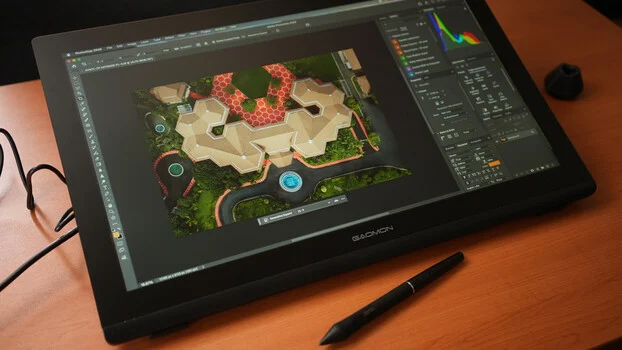
In an increasingly AI-driven landscape where sophisticated algorithms handle image editing, retouching, and even generative art, the fundamental value of a high-resolution pen display tablet for direct, tactile creative input remains undiminished. These devices offer an irreplaceable user experience, providing artists, photographers, and retouchers with the precision and control essential for refining digital creations. Among the burgeoning market of such tools, the GAOMON Pro 19 emerges as a noteworthy contender, meticulously addressing key user requirements for performance, portability, and ergonomic design, particularly within the demanding realm of professional visual media.
The modern creative workflow, while undeniably benefiting from AI’s efficiency, still mandates human oversight and the nuanced touch of an artist. AI can generate intricate patterns or suggest complex edits, but the final, critical adjustments—the subtle color corrections, the precise brush strokes for local enhancements, or the detailed masking for compositing—often necessitate the direct interaction that only a pen display can provide. The convenience of a pen display in this context is paramount, transforming a multi-step mouse-and-keyboard operation into an intuitive, direct-on-screen interaction. However, this convenience is often offset by the physical footprint of many professional-grade displays. A bulky, oversized unit can quickly negate the ergonomic advantages, forcing users into uncomfortable postures or demanding excessive physical movement. The ideal pen display, therefore, strikes a delicate balance between screen real estate, resolution, color accuracy, and a manageable form factor. It is this specific niche that the GAOMON Pro 19 endeavors to fill, promising a high-resolution, color-accurate experience without dominating the workspace.
Context: The Evolving Landscape of Digital Creation
The past decade has witnessed a dramatic transformation in digital art and photography, driven largely by advancements in software and hardware. From the early days of basic graphic tablets that offered only indirect input on a separate monitor, the industry has evolved to sophisticated pen displays that allow artists to draw directly onto a screen, mimicking the natural feel of traditional media. This evolution has democratized professional-grade tools, making them accessible to a broader audience, from seasoned professionals to aspiring digital artists.
The most recent paradigm shift has been the rapid integration of Artificial Intelligence into creative applications. AI-powered tools can now automate tedious tasks like background removal, sky replacement, noise reduction, and even generate entirely new imagery from text prompts. While these innovations streamline many aspects of the creative process, they also underscore the enduring importance of human intervention. AI is a powerful assistant, but it lacks the subjective judgment, emotional intelligence, and unique artistic vision that define human creativity. For instance, an AI might generate a stunning landscape, but a photographer will still need to meticulously retouch facial imperfections in a portrait or finely tune the color grading of a scene to evoke a specific mood. This is where the pen display tablet, like the GAOMON Pro 19, cements its irreplaceable role: as the primary interface for an artist to imprint their personal touch, refine AI-generated content, or execute original concepts with precision. The tactile feedback, pressure sensitivity, and direct visual correlation between pen movement and on-screen result remain unparalleled for tasks requiring fine motor control and artistic nuance.
The GAOMON Pro 19: A Closer Look at Design and Ergonomics
The GAOMON Pro 19 is engineered to meet the demands of modern digital artists who require both high performance and a practical, space-saving design. Its physical attributes are a testament to this philosophy, prioritizing a sleek profile without compromising on essential features.
Build and Design
The tablet presents itself as a streamlined slate, measuring 452.33 x 286.52 mm. Its thickness tapers from a slender 14.7 mm at its thinnest point to 28.7 mm at its thickest, largely due to the integrated stand mechanism. This compact form factor belies the robust technology housed within. The active drawing area, which also corresponds to the full size of the IPS display panel, measures 408.96 x 230.04 mm, offering ample space for detailed work without feeling cramped. The display itself is protected by anti-glare etched glass, a crucial feature for reducing reflections and providing a paper-like friction that enhances the drawing experience.
In terms of external controls, the GAOMON Pro 19 maintains a minimalist aesthetic. A single power button is discreetly placed on the upper-right-hand edge, accompanied by a convenient pen holder. This design choice contributes to a clean, uncluttered workspace, though it also implies a reliance on software or external peripherals for shortcut functionality, a point that warrants further discussion in the user experience section.
Physical Features and Connectivity
The rear of the device features a centrally located hub that neatly integrates all necessary input ports. This design choice helps manage cable clutter and maintains the tablet’s slim profile. The hub includes three distinct ports: one for the dedicated power supply, a full-sized HDMI connection for video input, and a versatile USB-C port.
GAOMON provides both an HDMI cable and a USB-A to USB-C cable in the box, facilitating a traditional two-cable connection setup. This widely compatible configuration ensures that the tablet can be connected to a broad range of Windows and macOS computers. However, for users with modern laptops or desktops equipped with full-featured USB-C ports (supporting USB 3.1 and DisplayPort video output), the GAOMON Pro 19 offers a more streamlined, single-cable solution. This enables video, data, and power transmission through a single USB-C to USB-C cable, drastically reducing cable management concerns and enhancing portability. It is important to note that while this single-cable option is available, the required full-featured USB-C to USB-C cable is not included in the standard package, which might necessitate an additional purchase for those seeking the most minimalist setup. Despite the USB-C power delivery capability, the display still relies on an external power brick for consistent and adequate power, a pragmatic decision given the power requirements of a 4K display of this size.
Adjustable Stand
Integral to the GAOMON Pro 19’s ergonomic design is its integrated, adjustable stand. Connected to the central hub, the stand features a release button that allows for seamless angle adjustments, ranging from a gentle 20 degrees to an almost upright 80 degrees. This wide range of viewing angles is a significant advantage, providing users with the flexibility to find the most comfortable and productive drawing or viewing position. Artists can opt for a shallow incline for drawing, mimicking a traditional drafting table, or position the display nearly vertically for use as a secondary monitor or for presenting work. This adaptability contributes significantly to user comfort during long creative sessions, mitigating potential strain on the neck, wrists, and back.
Unveiling the Visual Prowess: Resolution and Color Accuracy
For any pen display, the quality of its visual output is paramount. The GAOMON Pro 19 positions itself as a high-fidelity display, offering specifications that meet the rigorous demands of professional creative work.
Display Specifications
The tablet boasts a 16:9 aspect ratio, a standard for most digital content creation and consumption, and features a stunning 4K UHD resolution of 3,840 x 2,160 pixels. This ultra-high definition resolution on a 19-inch active area translates to an exceptionally dense pixel count, ensuring crisp details, smooth lines, and virtually invisible pixelation. For tasks like photo retouching, where minute imperfections must be precisely identified and corrected, or for intricate digital painting, where every brushstroke contributes to the overall texture, a 4K resolution is indispensable. It allows artists to zoom in significantly without losing visual fidelity, ensuring that final outputs are polished to perfection.
The display’s maximum brightness is rated at 220 cd/m², a typical value for IPS panels. While this might not be as high as some premium professional monitors, it is generally sufficient for indoor use in controlled lighting environments. As with most IPS panels, the perception of brightness can vary slightly depending on the viewing angle, though IPS technology is known for its wide viewing angles and consistent color reproduction across different perspectives.
Color Gamut Coverage
One of the standout features of the GAOMON Pro 19 is its impressive color gamut coverage, a critical metric for professionals who demand accurate color representation. The display is capable of rendering 1.07 billion colors, achieved through 8-bit color depth with Frame Rate Control (FRC), which effectively simulates 10-bit color. This extensive color palette ensures smooth gradients and vibrant, lifelike hues. More importantly, the tablet covers 99% of the sRGB color space, 96% of Adobe RGB, and 98% of DCI-P3.
- sRGB (standard Red Green Blue): This is the most common color space for web content, consumer electronics, and general-purpose digital media. 99% sRGB coverage ensures that colors displayed on the GAOMON Pro 19 will accurately reflect how they appear on the vast majority of screens.
- Adobe RGB: A wider color space than sRGB, Adobe RGB is particularly important for print media professionals and photographers. Its broader green and cyan primaries allow for a richer range of colors, especially in vibrant landscapes and product photography. 96% Adobe RGB coverage signifies that the display can accurately represent colors intended for high-quality printing.
- DCI-P3 (Digital Cinema Initiatives – Protocol 3): This color space is predominantly used in the film industry and for HDR content, offering an even wider gamut, especially in reds and greens, than sRGB. 98% DCI-P3 coverage makes the GAOMON Pro 19 suitable for video editors and animators working on projects destined for cinema or modern HDR displays.
Delta E Value and Brightness
Beyond raw gamut coverage, color accuracy is quantified by the Delta E (ΔE) value, which measures the difference between a displayed color and its true reference color. GAOMON rates the Pro 19 at Delta E < 1.5. A Delta E value below 2 is generally considered excellent for professional work, meaning that color errors are imperceptible to the human eye for most users. This low Delta E value indicates strong color fidelity, ensuring that what artists see on their screen is a true representation of their creative intent, a non-negotiable requirement for professional photographers, graphic designers, and video editors.
The combination of 4K resolution and wide, accurate color gamut coverage positions the GAOMON Pro 19 as a formidable tool for precision-demanding creative tasks. It allows artists to work with confidence, knowing that their color choices and fine details will translate faithfully across different platforms and output mediums.
Precision at Your Fingertips: The G-Pro Pen Technology
The pen is the primary interface for any pen display, and its performance directly impacts the user’s ability to create and manipulate digital content with precision and comfort. The GAOMON Pro 19 is bundled with the G-Pro Pen, which incorporates advanced technology designed to deliver a natural and highly responsive drawing experience.
Advanced Pen Features
The G-Pro Pen distinguishes itself with an impressive 16,384 levels of pressure sensitivity. This exceptionally high number allows for an unparalleled degree of control over line thickness, opacity, and brush effects, mimicking the nuanced pressure applied with traditional art tools. From the lightest feather strokes to the heaviest impasto, the pen accurately translates the artist’s intent. Furthermore, it boasts an initial activation force of just 2 grams, meaning even the gentlest touch is registered, preventing fatigue during long drawing sessions and enabling extremely fine detail work. The pen nibs are designed to retract up to 0.35 mm, providing a subtle spring-like feedback that further enhances the sense of pressure variability and control, making the drawing experience feel more organic and responsive.
EMR Technology
A key innovation in the G-Pro Pen is its reliance on battery-free Electromagnetic Resonance (EMR) technology. Unlike older pen technologies that required batteries, EMR pens draw their power directly from the display’s electromagnetic field. This fundamental difference offers several significant advantages:
- Lighter Weight: Without the need for an internal battery, the G-Pro Pen is inherently lighter, reducing hand fatigue during extended use.
- Thinner Design: The absence of a battery allows for a more ergonomic, slimmer pen body, making it more comfortable to hold and manipulate.
- No Charging Required: Users never have to worry about the pen running out of power in the middle of a creative session, ensuring uninterrupted workflow.
- Enhanced Reliability: The lack of internal power components can also contribute to greater durability and fewer potential points of failure.
This battery-free design contributes significantly to the overall user experience, making the pen feel more like a traditional drawing instrument.
Resolution and Responsiveness
In conjunction with the display, the G-Pro Pen achieves a resolution of 5,080 lines per inch (LPI). This high resolution ensures that every subtle movement of the pen is accurately translated onto the screen, resulting in smooth, precise lines and highly detailed artwork. The responsiveness of the pen, combined with the display’s rapid refresh rate, minimizes latency, creating a near real-time feedback loop between pen movement and on-screen result, further enhancing the natural drawing feel.
Lack of Touch Input
One notable feature absent from the GAOMON Pro 19 is multi-finger touch input. Unlike some other pen displays that incorporate this functionality, the Pro 19 relies exclusively on pen input for on-screen interaction. While this might be a consideration for users accustomed to touch gestures for zooming or rotating the canvas, it is often a preferred design choice for a segment of professional artists. Many artists find that disabling touch input prevents accidental marks or unwanted interactions from their hand resting on the screen, allowing for a more focused and precise pen-only workflow. This design philosophy aligns with the preference of users who value absolute precision and intentional input over multi-touch convenience, especially when engaged in highly detailed retouching or line art.
Seamless Integration: Setup and Software Ecosystem
The overall utility of a pen display is not solely determined by its hardware specifications but also by the ease of its setup and its seamless integration into a user’s existing software ecosystem. The GAOMON Pro 19 aims for a plug-and-play experience, complemented by robust driver support for advanced customization.
Plug-and-Play Experience
For initial use, the GAOMON Pro 19 is remarkably straightforward. When connected via the traditional HDMI and USB-A to USB-C cables, many systems will recognize it as an extended display and a basic HID (Human Interface Device) tablet without requiring immediate driver installation. This "plug-and-play" capability allows users to get started quickly, configuring the display as an extended desktop on their Windows or Mac laptop, with pen inputs immediately active on the tablet’s screen. This ease of initial setup is particularly beneficial for users who might be new to pen displays or who need a rapid deployment for a specific task.
Driver Installation and Customization
While basic functionality is available out of the box, unlocking the full potential of the GAOMON Pro 19 requires the installation of its dedicated driver, which can be downloaded from GAOMON’s official website. The driver software provides a comprehensive suite of customization options, essential for tailoring the tablet to individual preferences and specific workflows. Key driver functionalities include:
- Working Area Configuration: Users can define the specific area of the display that the pen interacts with, which is useful for multi-monitor setups or if only a portion of the screen is desired for input.
- Display Rotation: The driver allows for rotating the display’s orientation, accommodating left-handed users or specific ergonomic setups.
- Pressure Sensitivity Customization: This is a crucial feature for artists. The driver provides granular control over the pen’s pressure curve, allowing users to fine-tune how the 16,384 pressure levels translate into brush opacity, size, or other dynamic properties in their creative software. This customization ensures that the pen feels perfectly calibrated to the artist’s unique touch and artistic style.
- Monitor Mapping: For multi-monitor setups, the driver enables precise mapping of the pen display’s active area to specific monitors, ensuring that pen input correctly corresponds to the desired screen.
Workflow Integration
As an extended display, the GAOMON Pro 19 seamlessly integrates into professional creative workflows. Photographers can use it to display their image in full resolution for precise retouching in applications like Adobe Photoshop or Capture One, while keeping their tools and palettes on their primary monitor. Digital painters can leverage its direct input for natural brushwork in programs like Corel Painter or Clip Studio Paint. The ability to directly interact with the canvas enhances immersion and efficiency.
The Shortcut Button Conundrum
One significant design choice, as highlighted in the original review, is the absence of customizable shortcut buttons directly on the display panel. While this contributes to the tablet’s minimalist aesthetic and prevents accidental button presses, it introduces a workflow consideration. For many professional artists, programmable shortcut buttons (often referred to as "express keys") are vital for quickly accessing frequently used commands, brush settings, or tool switches without breaking the flow of their work. Without these on the GAOMON Pro 19, users are compelled to either:
- Keep their main keyboard within easy reach: This necessitates shifting focus and hand position away from the pen display, potentially disrupting the creative flow and impacting ergonomics.
- Utilize a separate shortcut remote or console: Many third-party devices exist that offer programmable buttons and dials, which can be positioned ergonomically next to the tablet. While effective, this represents an additional purchase and another device on the desk.
This limitation is a double-edged sword: it offers a clean design but demands a workaround for efficient access to shortcuts. An ideal enhancement for future iterations, or even as an optional bundled accessory, would be a dedicated shortcut remote that could perfectly complement the display’s capabilities and enhance overall user comfort and speed.
Cross-Platform Compatibility
A major strength of the GAOMON Pro 19 is its broad operating system compatibility. While primarily designed for Windows and macOS computers, it also extends its support to Linux and compatible Android devices. For Android devices, connectivity requires USB 3.1 and DisplayPort video output capabilities, typically found on higher-end smartphones and tablets. This multi-platform support significantly widens its appeal, making it a versatile tool for a diverse range of users and creative environments, from traditional desktop workstations to more mobile, Android-based setups for on-the-go sketching or light editing.
User Experience and Market Positioning
The GAOMON Pro 19 is clearly positioned as a solution for creative professionals and enthusiasts who value a direct, high-quality visual input experience without the physical bulk often associated with larger pen displays.
Core Strengths
The most compelling aspects of this pen display revolve around its blend of form and function. Its slim and sleek design is a significant advantage, particularly for users with limited desk space or those who prefer a minimalist setup. This compact form factor, however, does not come at the expense of ergonomic flexibility, thanks to the integrated and highly adjustable stand. This combination allows for comfortable, extended use in various postures and workflows.
The visual performance is another undeniable strength. The 4K display, coupled with its excellent color accuracy (99% sRGB, 96% Adobe RGB, 98% DCI-P3, and Delta E < 1.5), ensures that every detail and color hue is rendered faithfully. When properly calibrated to the ambient lighting, the display provides a reliable canvas for critical color work, which is paramount in fields like professional photography and graphic design. As both a display and a pen tablet, its space-saving form factor enhances user comfort by allowing for a more natural arm and hand position, reducing strain that can accumulate from working on larger, more cumbersome devices.
Addressing Limitations
As noted, the primary area for improvement lies in the absence of integrated shortcut buttons. While the minimalist design is aesthetically pleasing, the practical implications for workflow efficiency cannot be overlooked. Relying solely on a keyboard or an external remote for shortcuts can disrupt the immersive flow of direct-on-screen creation. Including even a handful of customizable buttons or bundling a dedicated, compact shortcut remote would significantly elevate the ergonomic experience and allow the device to function more independently, especially for artists who prefer to keep their main keyboard out of the immediate drawing area.
Target Audience and Value Proposition
The GAOMON Pro 19 is an attractive option for a specific demographic: photographers who meticulously fine-tune every pixel, digital artists who demand precise brush control, and anyone who enjoys the efficiency and intuitiveness of direct pen input on a high-resolution screen, but who are also conscious of desk space and budget. Its versatile connectivity, including the option for a single USB-C cable (albeit with an unbundled cable), further enhances its appeal for modern setups. Considering its feature set—4K resolution, excellent color gamut coverage, advanced pen technology, and an adjustable stand—the GAOMON Pro 19 offers a compelling value proposition, particularly for its price point. It democratizes access to professional-grade pen display technology without the premium cost often associated with market leaders.
Competitive Landscape
In a market populated by established brands and numerous emerging manufacturers, the GAOMON Pro 19 carves out its niche by offering a balanced blend of high-end features and practical design at a competitive price. While some competitors might offer larger screens or additional features like multi-touch input or integrated shortcut buttons, they often come with a significantly higher price tag or a larger physical footprint. The GAOMON Pro 19 competes effectively by focusing on the core essentials of a professional pen display: exceptional visual quality, precise pen input, and ergonomic adjustability, all within a compact and accessible package.
Implications for the Creative Industry
The emergence of devices like the GAOMON Pro 19 holds significant implications for the broader creative industry. By offering professional-grade features at a more accessible price point, it contributes to the democratization of advanced creative tools. This allows a wider range of individuals—from students and aspiring artists to freelance professionals and small studios—to invest in equipment that was once prohibitively expensive. This accessibility can foster greater innovation and creativity across the board, as more artists gain access to tools that empower them to fully realize their visions.
Furthermore, in an era where AI is rapidly transforming creative workflows, the continued development and refinement of human-interface devices like pen displays underscore the enduring value of human artistry and intuition. These tools are not being replaced by AI; rather, they are becoming even more critical as the primary means for artists to direct, refine, and imbue AI-generated content with their unique artistic signature. The GAOMON Pro 19, with its focus on precision, color accuracy, and ergonomic design, empowers artists to maintain control and inject their individual creativity into every pixel, ensuring that the human element remains central to the art of digital creation.
Conclusion
The GAOMON Pro 19 pen display tablet stands as a testament to the ongoing evolution of creative hardware, adeptly navigating the intersection of traditional artistic sensibilities and cutting-edge digital technology. In an age where AI augments many aspects of the creative process, the irreplaceable value of a direct, high-resolution pen-on-screen experience for precision and artistic control remains paramount. The GAOMON Pro 19 delivers on this promise with a compelling blend of a sleek, space-saving design, versatile ergonomic adjustability, and a visually stunning 4K UHD display boasting exceptional color accuracy across sRGB, Adobe RGB, and DCI-P3 gamuts. Its advanced G-Pro Pen, with 16,384 pressure levels and battery-free EMR technology, ensures a highly responsive and natural drawing experience.
While the absence of integrated shortcut buttons presents a workflow consideration, requiring users to adapt with external peripherals or keyboard access, this is a minor trade-off for a device that otherwise excels in its core functionalities. Its broad compatibility with Windows, Mac, Linux, and select Android devices further enhances its appeal and versatility. For photographers, digital artists, and retouchers who demand a professional-grade, color-accurate, and precise input device without the bulk or prohibitive cost of larger alternatives, the GAOMON Pro 19 emerges as a highly noteworthy and economically sensible option. It empowers creators to bring their visions to life with unwavering detail and vibrant accuracy, solidifying its place as a valuable tool in the ever-evolving toolkit of the digital artist.
